What is the Jira Hooks for Bitbucket Plugin?
The Jira Hooks for Bitbucket plugin is a project, which aims the integration of JIRA in Bitbucket. Especially checks regarding the integrity of a branch against the related Jira issue is the target. In several cases we have to check a lot of things regarding the related Jira issue, before we can push into a branch or perform a integration merge. Therefore this project has the target to provide a set of hooks, which checks the consistence of the issue before the action will be performed. To ensure the integrity between branch and the related issue, this plugin provides a Push hook and a Merge Hook. Every hook contains several checks to control your issue and your git workflow.


What can be checked?
|
|
Push |
Merge |
Merge Message Pull Request |
Bitbucket UI |
Local commit |
Description |
|---|---|---|---|---|---|---|
|
Commit needs issue key |
AVAILABLE | AVAILABLE | AVAILABLE | AVAILABLE | AVAILABLE |
A push or merge can be done only, if at least one commit of a push contains valid issue key reference |
|
All commits needs a issue key |
AVAILABLE | AVAILABLE | AVAILABLE | AVAILABLE | AVAILABLE |
A push or merge can be done only, if all commits of a push contains a valid issue key reference |
|
All issue keys in a commit |
AVAILABLE | AVAILABLE | AVAILABLE | AVAILABLE | AVAILABLE |
A push or merge can be done only, if all issue keys in a commit message are valid |
|
Escape issue keys |
AVAILABLE | AVAILABLE | AVAILABLE | AVAILABLE | AVAILABLE |
Escaped issue keys, will not be evaluated |
|
A branch needs a valid issue key |
AVAILABLE | AVAILABLE | AVAILABLE | AVAILABLE | N/A |
A branch can only be created, merged, pushed is the name contains a valid issue key. |
|
Issue status |
AVAILABLE | AVAILABLE | AVAILABLE | AVAILABLE | AVAILABLE |
A push or merge can be done only, if the related issue is in the configured status. The status can be configured via regular expression. |
|
Branch naming convention |
AVAILABLE | N/A | N/A | AVAILABLE | N/A |
The name of a new branch, will be checked. If a new branch do not match the naming convention, the push will be blocked. The naming convention can be configured via regular expression. |
|
Squash check |
AVAILABLE | N/A | N/A | N/A | N/A |
A push with more than one commit will be blocked. A push is only allowed, if branches contains exact one commit. If the branch contains more than one commit, the commits need to be squashed. |
|
Merge commit check |
AVAILABLE | N/A | N/A | N/A | N/A |
A push can be done only, if the push contains no merge commit. This will enforce, that merges will be done via Stash only. If a merge has been done with a different tool (e.g. SourceTree/SmartGit or simple in console) the resulting merge commit will be blocked. |
|
JQL check |
AVAILABLE | AVAILABLE | AVAILABLE | AVAILABLE | AVAILABLE |
A push or merge can be done only, if the related issue matchs a given JIRA JQL expression. |
|
Rebase check |
N/A | AVAILABLE | AVAILABLE | N/A | N/A |
Force a rebase of the source branch before a integration merge can be done. If a rebase is possible and makes sense, the merge is not allowed without rebasing the branch first. In result this check enforces the "The Rebase Option" in the following tutorial: https://www.atlassian.com/git/tutorials/merging-vs-rebasing/conceptual-overview It is recommended to use this option on private forks only. The rebase strategy can be used with the force push only, which could have influence to other team members. Use this strategy carefully in a public repository. See also pros and cons in this Atlassian article https://www.atlassian.com/git/articles/git-team-workflows-merge-or-rebase/
|
|
Syntax check |
AVAILABLE | AVAILABLE | AVAILABLE | AVAILABLE | AVAILABLE |
A push or merge can be done only, if all commits match a specified syntax. This syntax can be configured based on regular expression. |
|
|
|
|
|
|
|
|
Configuration of the hooks
This configuration possibilities are available in the push hook and in the merge hook.
|
Fields |
Description |
Example |
||||||||||||||||||||||||||||||||||||
|---|---|---|---|---|---|---|---|---|---|---|---|---|---|---|---|---|---|---|---|---|---|---|---|---|---|---|---|---|---|---|---|---|---|---|---|---|---|---|
|
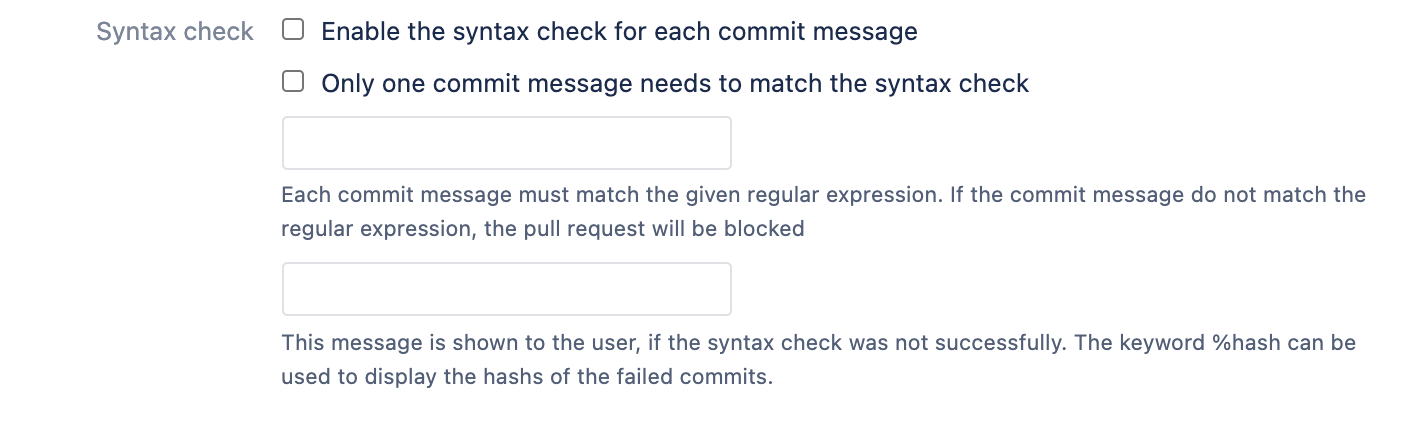
Syntax check |
If this option is enabled, the related text field should contain a regular expression, which will define the syntax of the commit messages. |
If the option is set, and the following regular expression is given, ^\[([A-Z]+)-(\d+)\](.|\n)+ then each commit message must start with a issue key, which is in brackets. Additionally after the key there must be a further description (e.g. "[TEST-1] further text" will be accepted. Only "[TEST-1]" as commit message will not be accepted. Also "TEST-1 and some further text" will not be accepted, because of the missing brackets. If the commit message do not match, the push or merge is blocked. |
||||||||||||||||||||||||||||||||||||
|
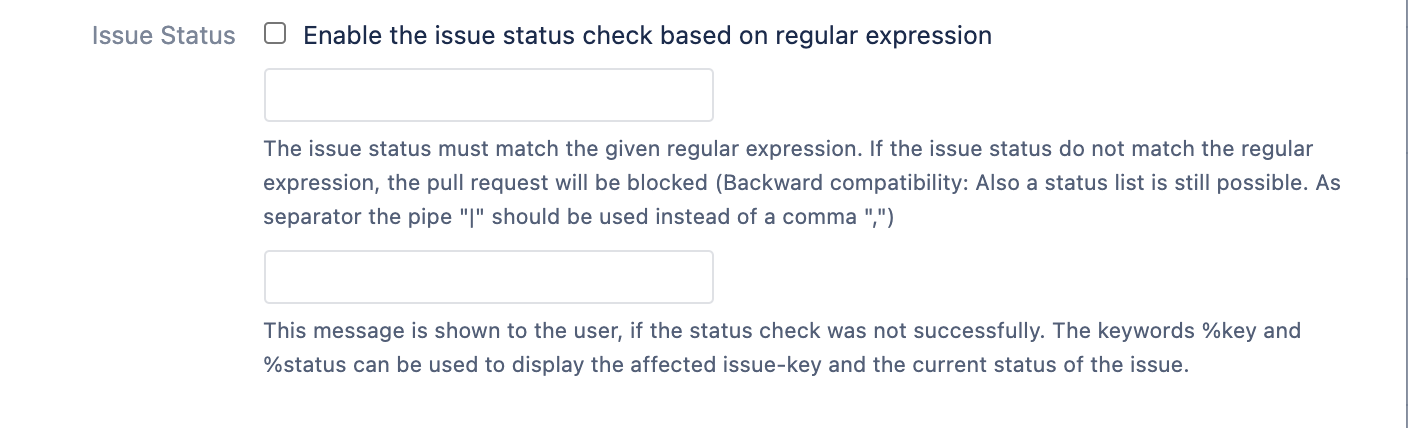
Issue status |
If this option is enabled, the related text field should contain a regular expression, which will define the valid status of issue key references. |
If the option is set, and the following regular expression is given, Reviewed|Integration Request then a merge or a push can be done only, if the issue status is "Reviewed" or "Integration Request". (Of course also a more complex regular expression is possible.) If you have a international company and if you will support different languages, then you have to respect this in the regular expression. For example the regular expression To Do|Aufgabe will support the german and english version of the related status.
|
||||||||||||||||||||||||||||||||||||
|
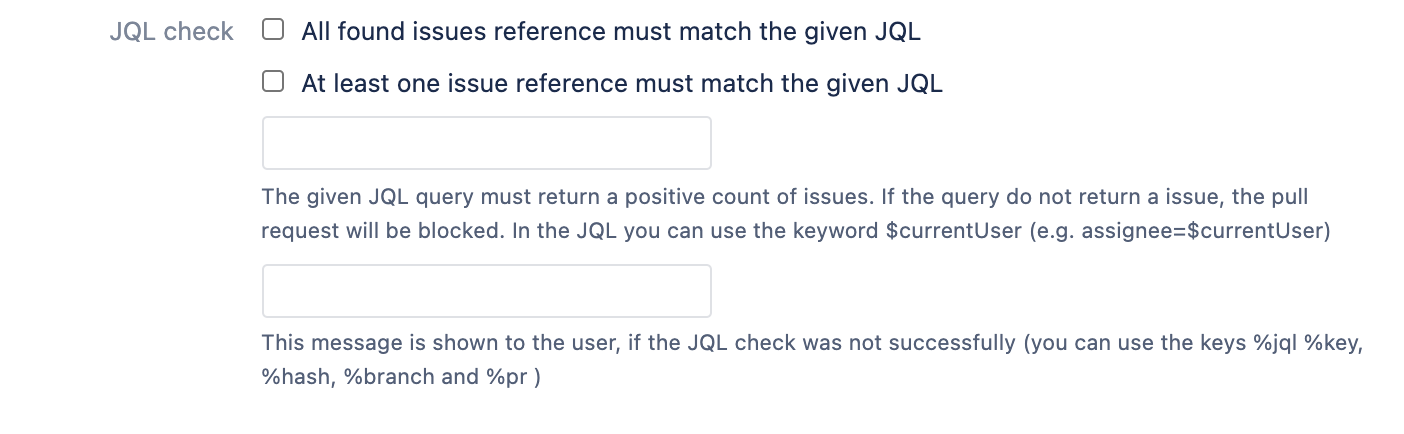
JQL check |
If this option is enabled, the related text field should contain a valid JIRA JQL expression. A commit will be accepted only, if all issue key references will match the given JQL |
If the option is set, and the following JQL is given, (assignee=benni and fixVersion is not EMPTY) then a given issue reference will be checked with this JQL. So a merge or push is only possible, if the assignee is the user "benni" and the fix version is set to any version. (assignee=$currentUser) You can also use the keyword "$currentUser", which will be replaced with the user wich will execute the merge or push. So the JQL ensure that the merge/push can only be done by the assignee of the issue.
|
||||||||||||||||||||||||||||||||||||
|
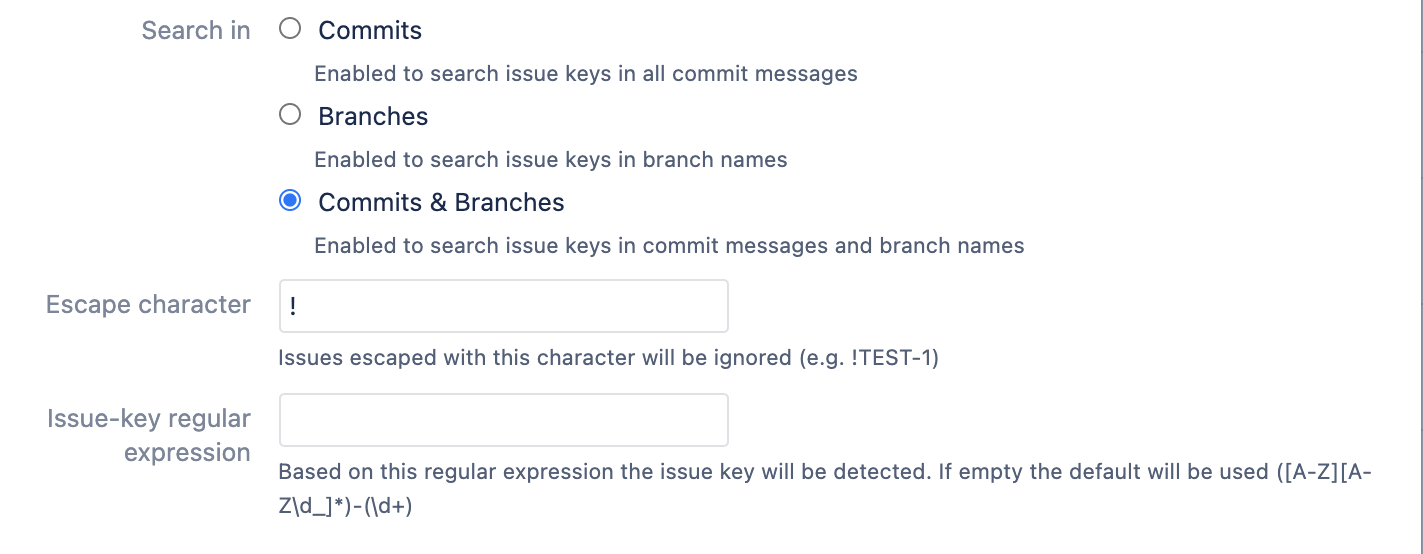
Issue key search settings |
The character will be used in in combination with regular expressions. Please think about the character.
|
If you want to mention another issue key in your commit message that is related to your change but should not be validated in relation to your work, then you can escape this issue key TEST-2 my change has a relation to !TEST-1
|
||||||||||||||||||||||||||||||||||||
|
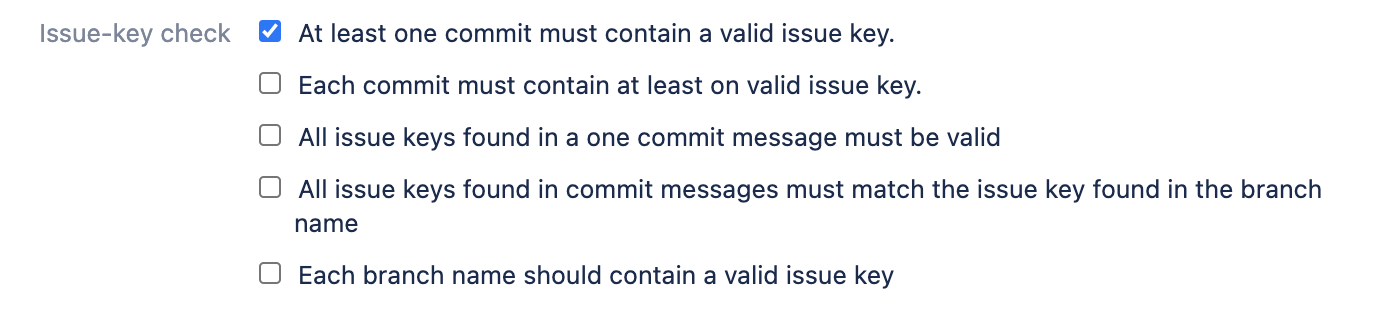
Issue-key Check |
If this options are set, a issue key must exist. Additionally the issue key must reference a valid issue in JIRA. There are 5 possibilities to check issue-keys
Regarding the issue key in branch name you can explicitly disable some branches (e.g development or master). This exception is only valid for the push hook. |
This is a push example, but the behavior regarding the merge hook is the same. (e.g. TEST-10000 does not exist)
|
||||||||||||||||||||||||||||||||||||
|
Application links |
You can specify how application links should behave. You can specify where issues will be searched If selected, only configured project links will be used for validation If the Bitbucket project is connected to one or more Jira projects via Application Link, then select this option. This will result in searching for matching issues only in the connected projects. If selected, not all application links needs to be reachable/accessible By default, all project links that have been configured must also be accessible. If not, then the validation fails. Set this option if a valid application link is sufficient.
By default, the issue keys are searched across all application links and across all possible projects. This is the simplest configuration, but also the one that consumes the most performance.
|
|


Common Condition Configuration
This configuration possibilities are available in the push hook and in the merge hook.
|
Fields |
Description |
Example |
||||||||||||
|---|---|---|---|---|---|---|---|---|---|---|---|---|---|---|
|
Exception |
If this option is enabled, the related text field should contain a valid list of user group. If the user which will do the merge/push is in the given group, then the checks will not be evaluated.
|
This is a push example, but the behavior regarding the merge hook is the same. If the option is set, and the group admin is configured. Additionally there are several commits which would block a push or merge (e.g. no issue key reference is available), then the behaviour is:
|
||||||||||||
|
Skip Commits |
Based on a keyword in a commit message you can skip the all checks for this commit. The keyword can be configured via regular expression. As soon the regular expression match, the commit will not be validated |
git merge -m "non-functional: just correct some typos" branch-name
git push
|


Special Merge Checks and Conditions
On the "Merge check" configuration page, the above common checks/conditions can be activated and configured. Additionally the following merge specific checks can be configured
|
Fields |
Description |
Example |
||||||
|---|---|---|---|---|---|---|---|---|
|
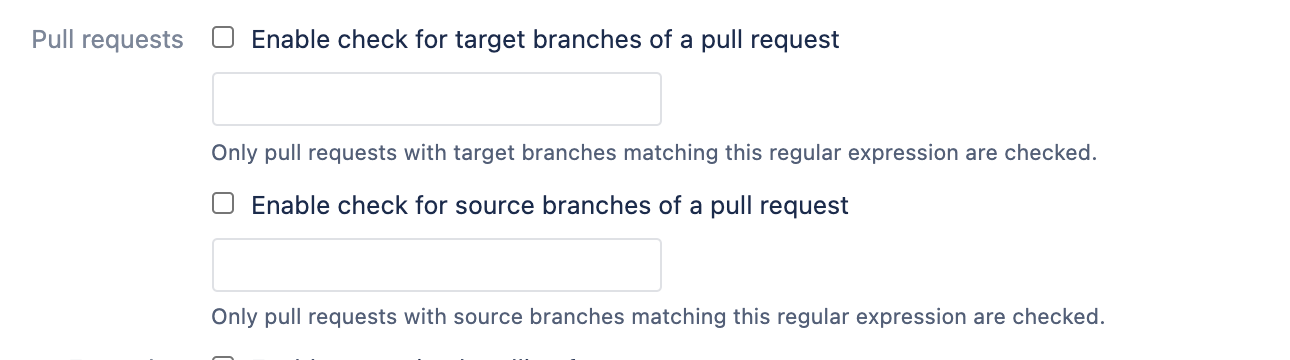
Pull requests |
Via this options you can enable/disable the check based on PR source and/or target branch. If the option for source/target branch is enabled, then the check will be executed only, if the branch name will match the related regular expression. |
Example 1: Do not check hotfix branches
Example 2: Do only check pull requests going into release branches
|
||||||
|
Rebase check |
If this option is enabled a merge can only be done only, if in the master are no newer commits. If there are newer commits, which are not in the source branch, the source branch must be rebased on to the top of the target branch. This will create a clean branch-merge picture and will resolve merge conflicts in a early stage. |
|
||||||
|
Merge check |
The merge check strategy can be checked: |
In this example, the issue TEST-1 is valid and TEST-1000 is invalid (e.g. TEST-10000 does not exist) Example 1: Both options are selected
git checkout -b my-branch/something
git commit -m 'TEST-10000 this is a example'
git push
git checkout master
git merge my-branch/something -m "TEST-1 my commit message"
The merge will be accepted, because only the merge commit message will be evaluated
Example 2: Only merge message check is enabled
git checkout -b my-branch/something
git commit -m 'TEST-1 this is a example'
git push
git checkout master
git merge my-branch/something -m "TEST-10000 my commit message"
The merge will be rejected, because the issue TEST-10000 does not exist.
|


Special Push Checks and Conditions
On the "Push check" configuration page, the above common checks/conditions can be activated and configured. Additionally the following push specific checks can be configured
|
Fields |
Description |
Example |
||||||||
|---|---|---|---|---|---|---|---|---|---|---|
|
Enabled branches |
If this option is enabled, the related text field should contain a regular expression, which will define the branches. If the branch will match the regular expression, the merge/push will be checked. If the branch will not match, the checks will be skipped. |
If the option is set, and the following regular expression is given, Bash
then the checks will be validate only if:
If you will push or merge change-sets in a branch with a other name, then the checks will not be evaluated and the merge/push is always allowed.
|
||||||||
|
Ignore force pushs |
If enabled force pushes will not be checked |
|
||||||||
|
|
|
|
||||||||
|
Squash check |
If this option is enabled a push can be done only, if the push contains only one commit. If there are more commits, the push will be rejected. After squashing the commits to one commit the push is allowed again. |
|
||||||||
|
Merge commit check |
If this option is not enabled a push can be done only, if in the push contains no merge commit. This ensures that commits can be done via Bitbucket only. But of course there can be exceptions. Therefore you can allow merge commits, but only if there is a special keyword given.
|
Example: skip keyword = "merge-skip-fantasy"
|
||||||||
|
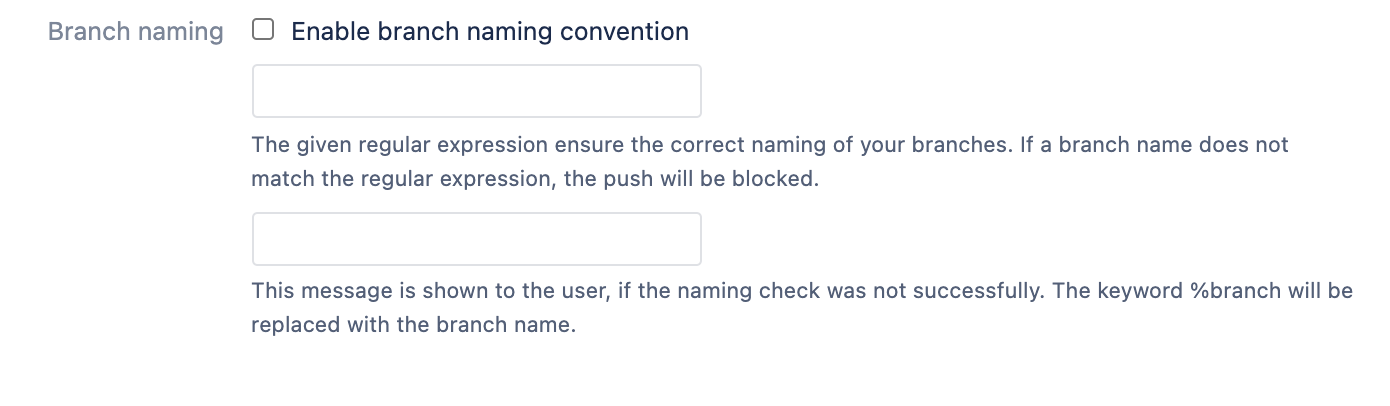
Branch naming convention |
If this option is enabled, the related text field should contain a regular expression, which will define the syntax/naming of all new branches. This check will only be executed, if a new branches will be created via a push from a client. The creation of a branch via Bitbucket do not execute this check.
|
If the option is set, and the following regular expression is given, branches\\/[bug|feature]+\\/.* then each new branch needs to match this regular expression.
|
||||||||
|
Online changes |
The online change options allow you to specify whether the hooks should also check the configured changes when the changes are made via the Bitbucket web interface |
|




Local Commit-Check Configuration
The configuration is not needed. It will be used the same configuration as in the push-check configuration. The only thing which is needed is the installation of a local git hook, which will evaluate the commit message via rest-api. (See How to configure a local commit hook? for more information)
How does it have an affect?
How does the merge hooks have an affect?
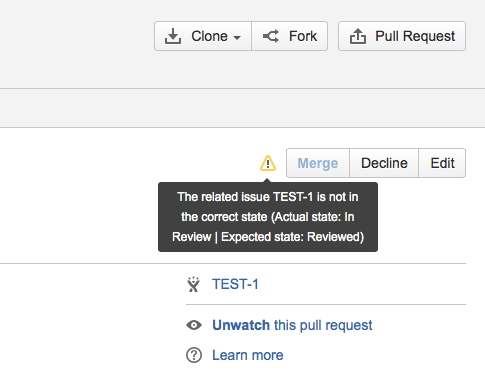
If one of the configured checks, will be evaluated to false, then a merge will be blocked with a error message.
How does the push hooks have a affect?
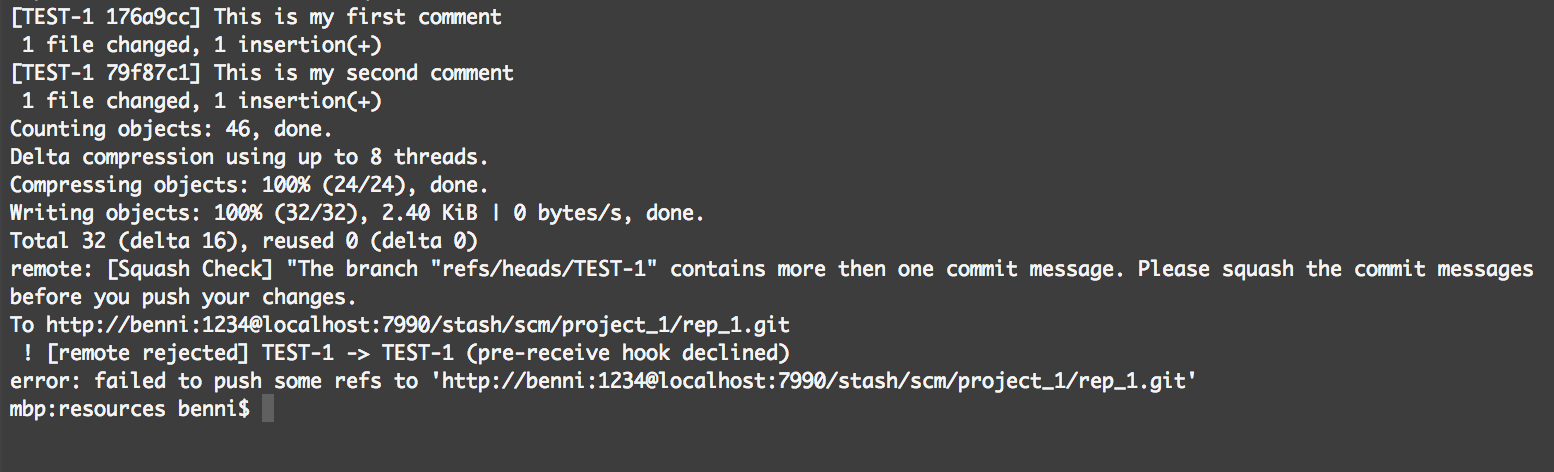
If one of the configured checks, will be evaluated to false, then a push will be blocked and the push response prints a detailed error message.
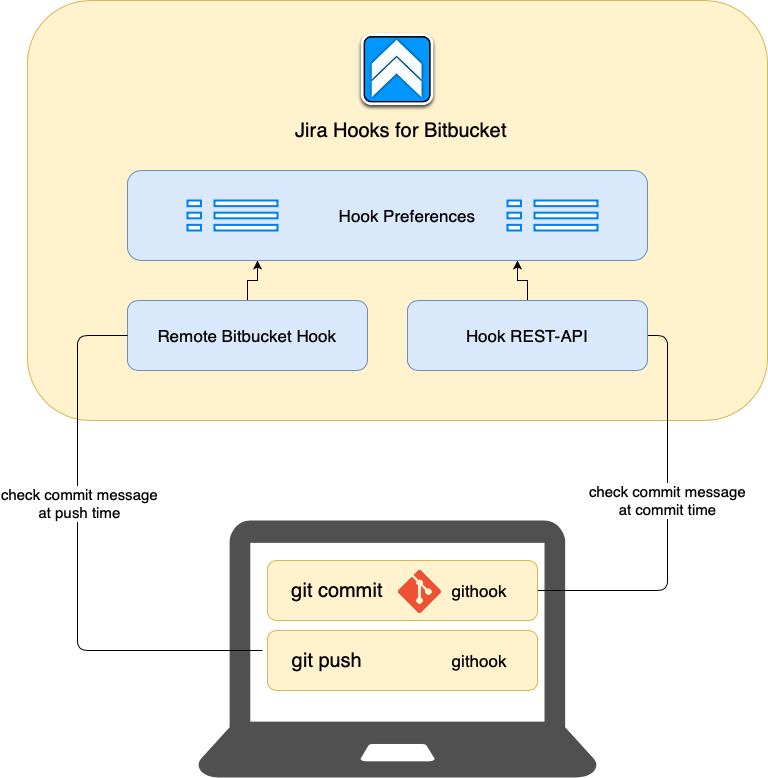
Local and remote check
With our hook it is possible to check the commit message at push time. Faulty commits are rejected and the commits have to be revised. This is annoying because there are maybe several commits affected, which makes changes difficult. So, why not do the same checks at commit time? That's why we introduced a REST API check. This REST-API check works with the same preferences, so the preferences can be managed centrally. By using a normal git-hook, you can perform the same checks locally at commit time and remote at push time.