

Jira Hooks for Bitbucket Cloud supports local commit and push validation through a Validation API and lightweight Git hook scripts.
This allows developers to validate commits and pushes before changes reach Bitbucket Cloud. The validation uses the same Process Guardian rules that are configured in Jira Hooks for Bitbucket, for example issue key checks, JQL checks, naming conventions, and consistency checks.
This is useful because Bitbucket Cloud currently does not provide a cloud-side mechanism to block pushes before they are accepted. Local Git hooks provide the earliest possible validation point in the developer workflow.
Ready-to-use Git hooks
To simplify adoption, Jira Hooks for Bitbucket includes a fully implemented Git hook package for local commit and push validation. Teams can install the hooks directly and immediately enforce Process Guardian rules during git commit and git push, without configuration overhead or maintaining their own integration.
The project includes:
-
A reusable Python library
-
A ready-to-use
commit-msgandpre-pushhook installable withpip -
Built-in HMAC signing
-
Enriched and structured terminal output
Check it out and access the source code:
-
https://bitbucket.org/devopssystems-public/jira-hooks-for-bitbucket-githooks
-
https://github.com/devopssystems/Jira-Hooks-for-Bitbucket-Git-Hooks
📣 Feedback and collaboration is welcome!
Configure the Validation API
Before the API can be used, it must be enabled and configured in Jira Hooks for Bitbucket Cloud in the Process Guardian section. The Validation API can be configured either at the repository level or at the workspace level.
An important aspect of this approach is that rule management remains fully centralized. Validation logic is not duplicated or maintained in local hook scripts. Instead, the local hooks simply collect commit and branch information and submit it to the Validation API. The Process Guardian then evaluates the request using the current repository or workspace configuration stored in Bitbucket.
Repository configuration
A repository-level configuration does not create a separate Validation API endpoint. The same Validation API is used in both cases. The primary benefit of a repository-level configuration is that it generates a dedicated validation token for a specific repository. This allows access to be managed independently for each repository.
Where can I find the settings?
-
Workspace Settings → Forge → Jira Hooks for Bitbucket → Process Guardian
-
Repository Settings → Forge → Jira Hooks for Bitbucket → Process Guardian
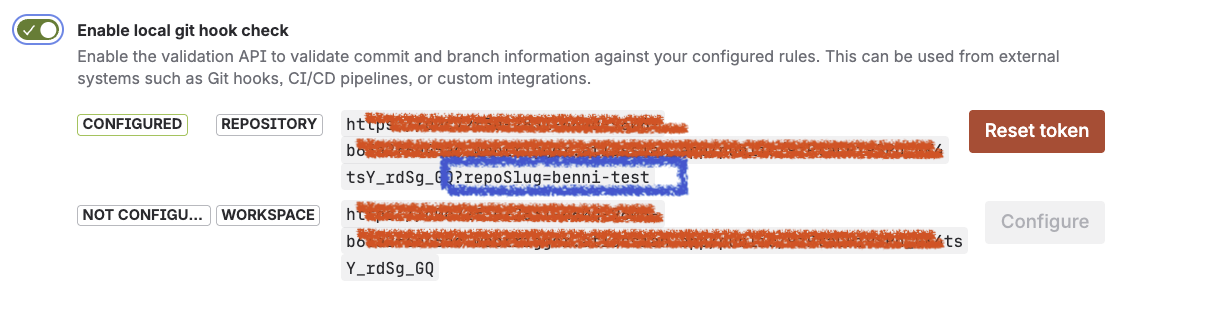
The generated Validation API URL automatically includes the repository identifier as a query parameter.
Example API Endpoint:
-
Repository: https://<validation-endpoint>>?repoSlug=my-repository
-
Workspace: https://<validation-endpoint>
As a result, Git hooks, CI/CD pipelines, and custom integrations do not need to provide the repository information separately when calling the API.
Workspace configuration
A workspace-level configuration uses the same Validation API but generates a generic endpoint that is not bound to a specific repository.
In this case, the repository must be supplied by the client during the request, either through:
-
the
repoSlugURL parameter -
the
repoSlugfield in the request payload -
the
repositoryUuidfield in the request payload
This allows a single validation endpoint and token to be shared across multiple repositories within the same workspace.
Typical use cases:
-
Centralized Git hook deployments
-
Shared CI/CD validation services
-
Workspace-wide automation
-
Simplified administration across multiple repositories
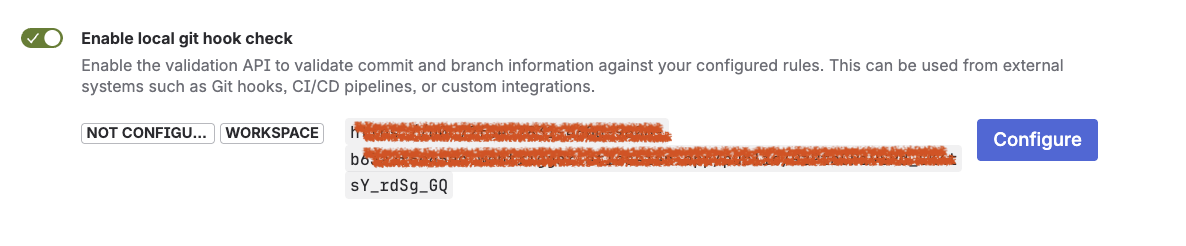
Configuration status
Each Endpoint has its current status:
|
Status |
Description |
|---|---|
|
Configured |
A validation token exists and the Validation API is ready to accept requests. |
|
Not configured |
No validation token exists. The Validation API cannot be used because no authentication token has been generated yet. |
When a configuration is in the Not configured state, local Git hooks, CI/CD pipelines, and custom integrations cannot authenticate against the Validation API.
Generate a validation token
Select Configure to generate a validation token and enable the Validation API. After selecting Configure, Jira Hooks for Bitbucket displays the generated authentication token together with the Validation API endpoint URL.
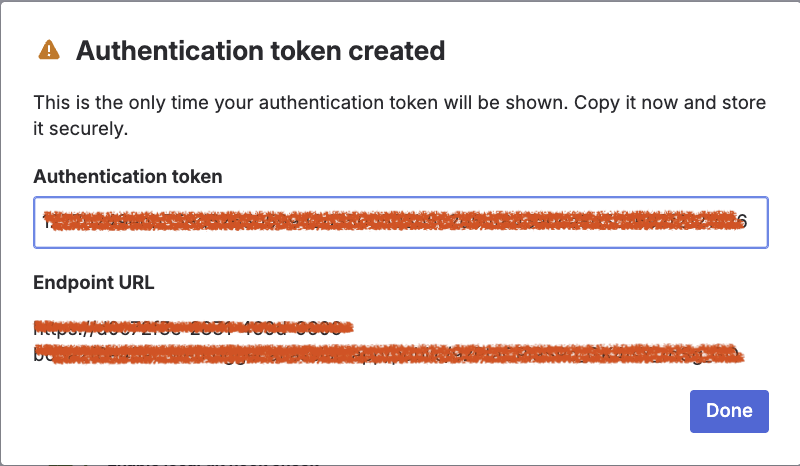
The dialog contains:
|
Field |
Description |
|---|---|
|
Authentication token |
Secret used to create the HMAC signature for API requests. |
|
Endpoint URL |
Validation API endpoint that receives validation requests. |
The displayed values correspond to:
JHFB_ENDPOINT and JHFB_SECRET
used by local Git hooks, CI/CD pipelines, and custom integrations.
Store the token securely
The authentication token cannot be viewed again after the dialog is closed.
Important: The authentication token is shown only once and must be stored securely.
Store the token immediately in a secure location, for example:
-
A password manager
-
A secret management system
-
CI/CD secret storage
-
Local hook configuration files
While the token should be treated as a secret and stored securely, it is important to understand its scope. The token is used exclusively to authenticate requests to the Validation API. It does not grant access to repository contents, workspace settings, source code, Jira data, or administrative functionality.
A user possessing the token can only submit validation requests and receive validation results based on the configured Process Guardian rules.
The Validation API:
-
Can validate commits, branches, and pull request-related payloads
-
Can execute configured Process Guardian rules
-
Cannot read repository contents
-
Cannot modify repository settings
-
Cannot modify workspace settings
-
Cannot create, update, or delete Jira issues
-
Cannot perform administrative actions
Lost token
If the authentication token is lost, forgotten, or accidentally deleted, it cannot be recovered.
In this case:
-
Select Reset token
-
Generate a new token
-
Update all Git hooks, CI/CD pipelines, and custom integrations with the new secret
After a token reset, all previous tokens become invalid immediately.
Do it by your own
The provided Git hooks are the recommended way to integrate local commit and push validation. They require no custom development and can be installed within minutes.
If you want to build your own hooks, integrate the validation into a CI/CD pipeline, or develop a custom client, the following sections describe the Validation API, request payloads, authentication, and response format in detail.
Required configuration
The local hooks require two configuration values:
|
Variable |
Description |
|---|---|
|
|
The Validation API endpoint generated by Jira Hooks for Bitbucket Cloud. |
|
|
The HMAC secret used to sign requests. |
Example:
JHFB_ENDPOINT="https://<your-validation-endpoint>"
JHFB_SECRET="<your-hmac-secret>"
Payload structure
The Validation API expects a JSON payload with branch and commit information.
Fields
|
Field |
Required |
Description |
|---|---|---|
|
|
Yes |
Name of the branch that should be validated. |
|
|
Yes |
Either |
|
|
Yes |
List of commits that should be validated. |
|
|
No |
Locale for translated messages, for example |
|
|
No |
Repository slug, if not already included in the endpoint URL. |
|
|
No |
Repository UUID, if not already included in the endpoint URL. |
Commit object
Each commit object can contain:
|
Field |
Description |
|---|---|
|
|
Commit hash. |
|
|
Commit message. |
|
|
Display name of the commit author. |
|
|
Optional URL to the commit. |
Example payload for validation
{
  "branchName": "feature/ABC-123-local-check",
  "triggerType": "COMMIT/PUSH",
  "locale": "en-US",
  "commits": [
    {
      "hash": "0000000000000000000000000000000000000000",
      "message": "feat(ABC-123): add local validation",
      "authorDisplayName": "Jane Developer"
    }
  ]
}
The payload always contains a commits array. This allows the same API structure to be used for both commit and push validation. When triggerType is set to COMMIT, the payload should contain exactly one commit. If multiple commits are provided, only the first commit is considered for validation and additional commits are ignored.
When triggerType is set to PUSH, all commits contained in the payload participate in the validation process. Depending on the configured rules and targets, validations can be executed against every commit in the push.
Calling the Validation API with curl
The Validation API requires an HMAC-SHA256 signature in the x-hub-signature-256 header.
The signature must be calculated over the raw JSON request body using JHFB_SECRET.
BODY='{"branchName":"feature/ABC-123-local-check","triggerType":"PUSH","locale":"en-US","commits":[{"hash":"f00ba41234abcd1234abcd1234abcd1234abcd12","message":"feat(ABC-123): add local validation","authorDisplayName":"Jane Developer"}]}'

SIGNATURE="sha256=$(printf %s "$BODY" | openssl dgst -sha256 -hmac "$JHFB_SECRET" -hex | sed 's/^.* //')"

curl \
  -X POST \
  -H "Content-Type: application/json" \
  -H "x-hub-signature-256: $SIGNATURE" \
  --data "$BODY" \
  "$JHFB_ENDPOINT"
If the endpoint URL does not already identify the repository, pass the repository as a query parameter or include repoSlug or repositoryUuid in the request body.
Result
The API returns a structured validation result.
The response includes:
|
Field |
Description |
|---|---|
|
|
Overall result, for example |
|
|
Rule-level validation results. |
|
|
Detailed check results with translated messages. |
|
|
Details about evaluated conditions. |
|
|
Request-level validation errors. |
If the result is blocking, the local hook can stop the commit or push.
HTTP status codes
The Validation API uses standard HTTP status codes to indicate whether the request itself was processed successfully. Validation results such as PASS, WARNING, SKIP, or BLOCK are returned in the response body and are independent of the HTTP status code.
|
HTTP status |
Description |
|---|---|
|
200 OK |
The request was processed successfully and a translated validation result was returned. The actual validation outcome is available in the |
|
400 Bad Request |
The request was invalid. Typical causes include malformed JSON, an invalid payload structure, missing required fields, an unsupported trigger type, or a missing repository identifier. |
|
401 Unauthorized |
Authentication failed. This can occur when the |
|
404 Not Found |
The referenced repository could not be resolved. Verify that the repository identifier, repository UUID, or repository slug is correct. |
|
500 Internal Server Error |
An unexpected server-side error occurred while processing the request. Review the application logs and try the request again. |
Important
A successful HTTP response does not necessarily mean that the validation passed.
For example, a request may return:
{
  "result": "BLOCK"
}
together with:
HTTP/1.1 200 OK
In this case, the request itself was valid and processed successfully, but the evaluated Process Guardian rules blocked the operation.
Key takeaway
Local commit and push validation brings Process Guardian checks directly to the developer machine. It allows teams to detect compliance issues before code reaches Bitbucket Cloud, while reusing the same centrally configured rules used for pull request validation.