

Configuration as code allows teams to define and manage rules directly within the repository using a YAML file.
Instead of configuring rules only through the user interface, rules can be versioned, reviewed, and maintained alongside the codebase. This approach improves transparency, traceability, and consistency across different branches and environments.
Enable configuration as code
Configuration as code must be enabled in the repository settings within the add-on. The following screenshot shows the configuration options:
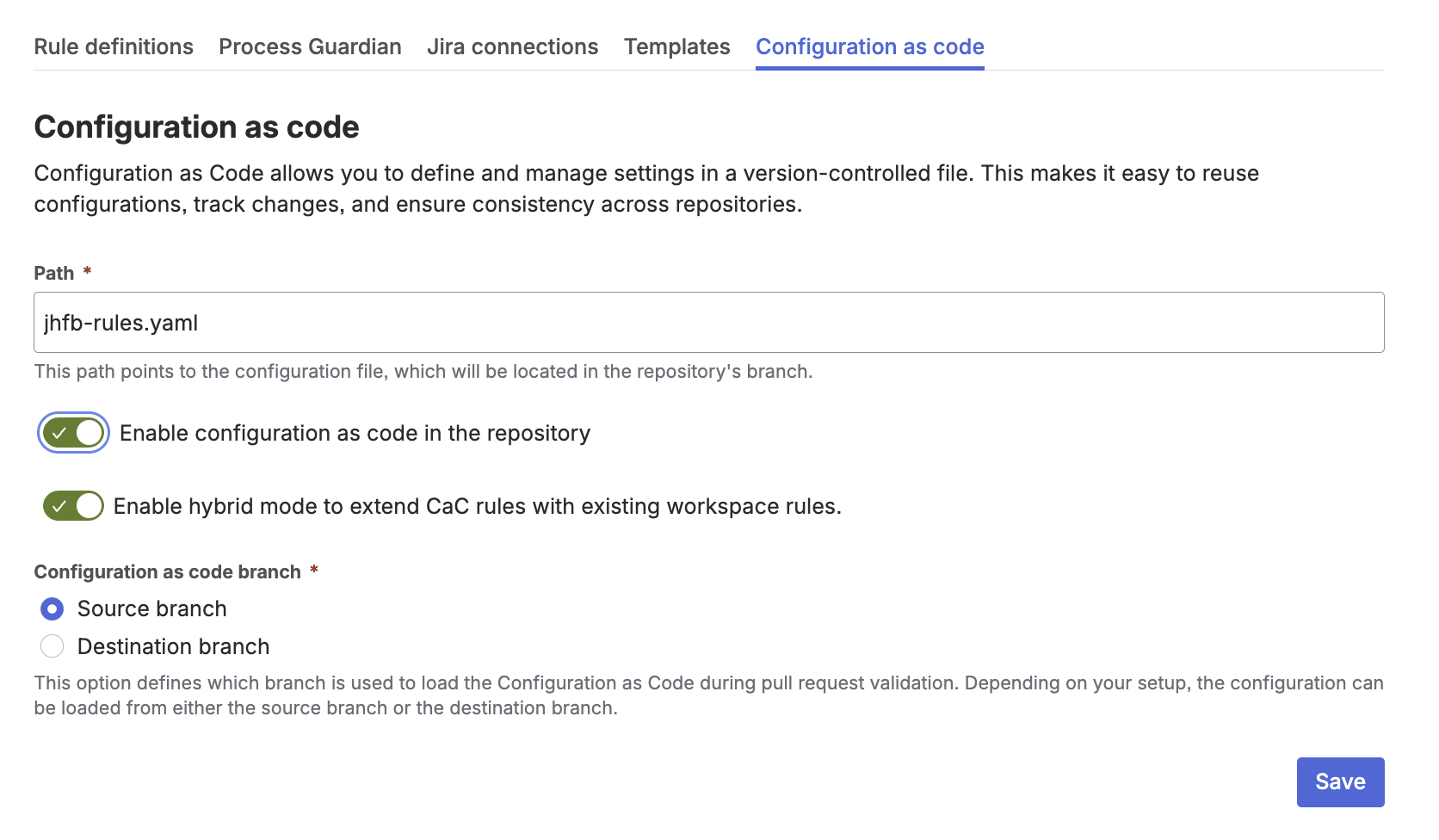
Once enabled, the system expects a YAML configuration file in the repository. The file location is configurable and can be adapted to match the repository structure.
The following options are available:
-
Enable configuration as code in the repository activates YAML-based rule configuration
-
Enable hybrid mode allows combining repository-based configuration with existing workspace rules
-
Path defines the location of the YAML file within the repository branch
-
Configuration as code branch defines which branch is used to load the Configuration as Code during pull request validation. Depending on your setup, the configuration can be loaded from either the source branch or the destination branch.
How it works
As soon as the rules are needed, for example during the merge of a pull request, the system looks for a YAML file at the configured path in the repository of the source branch.
-
If a configuration file is found, the rules are parsed based on the defined configuration schema
-
If no configuration file is found, no repository-based configuration as code rules are applied, and no rules are evaluated unless workspace rules are available through a hybrid setup
In hybrid mode, repository-based configuration as code rules are combined with rules that are configured in the workspace UI. This allows teams to keep centrally managed workspace rules while adding specific rules through YAML in the repository.
Each branch can define its own configuration. This means that different branches can contain different rule sets, allowing teams to adapt compliance requirements to specific workflows.
Example
rules:
  - title: "Issue Key Validation"
    description: "Ensures that pull requests reference valid Jira issues"
    error: "No valid Jira issue key found"
    hint: "Add a valid Jira issue key to the branch name or commit message"
    variant: "KEY"
    scope: repository
    triggers: [PULL_REQUEST]
    target: [ "COMMITS", "BRANCH" ]
    checks:
       issue:
         consistency: true
         key: true
    conditions:
      pullRequest:
        source:
          include: ["^feature/.*$"]
        destination:
          include: ["^main$"]
In this example, the configuration defines a rule that validates Jira issue keys in Commits and Branches if a pull requests will be merged from feature branches into main. The rule requires a valid issue key in both the branch name and the commit message, and both references must be consistent.
User interface
Rules defined via configuration as code can also be viewed in the user interface. This provides full visibility into the active rule set of a branch without requiring direct access to the repository files, making it easier for developers and reviewers to understand which compliance checks are applied.
To view them:
-
Navigate to the Rules tab
-
Select the desired branch
-
The UI displays the rules of that branch in read-only mode
This allows users to understand which rules are active without modifying the configuration directly.
 UI to YAML workflow
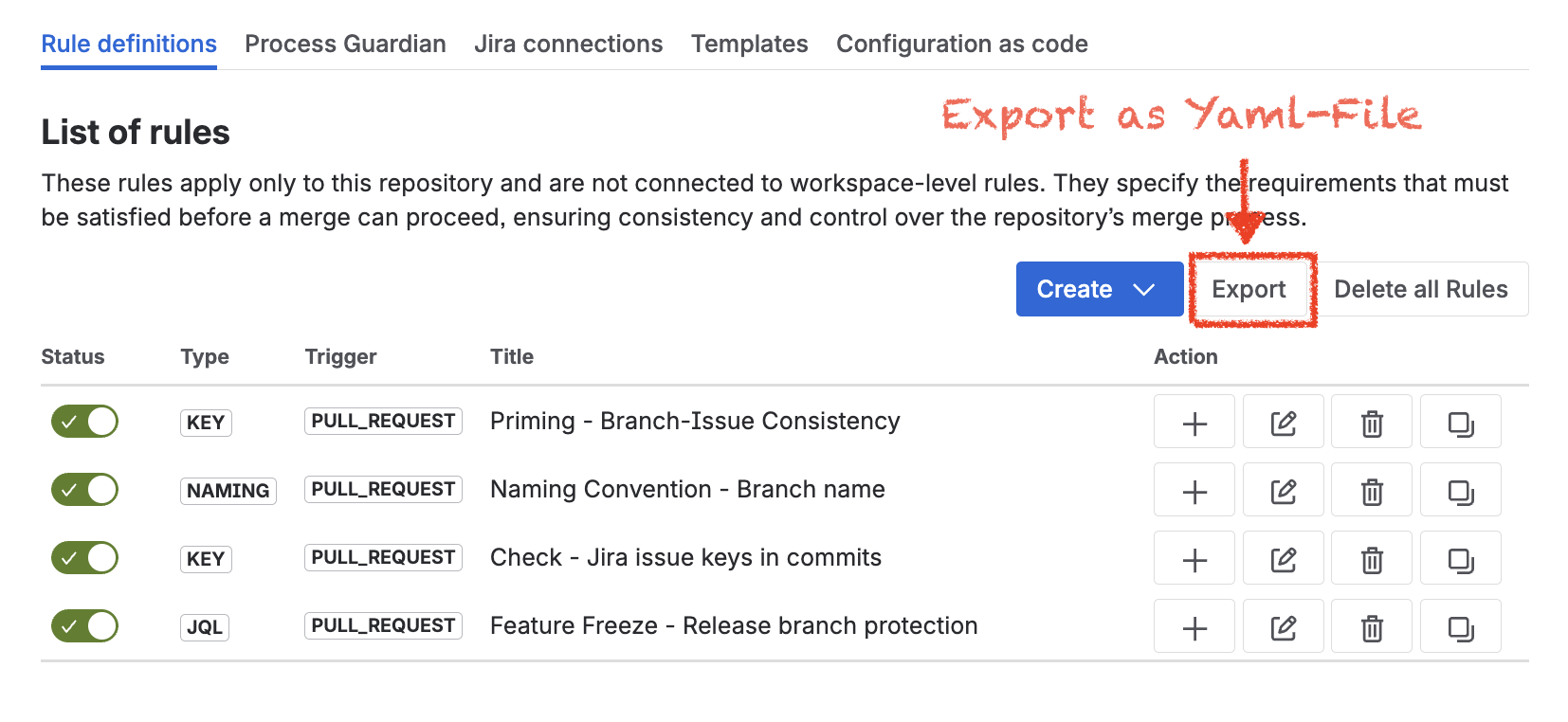
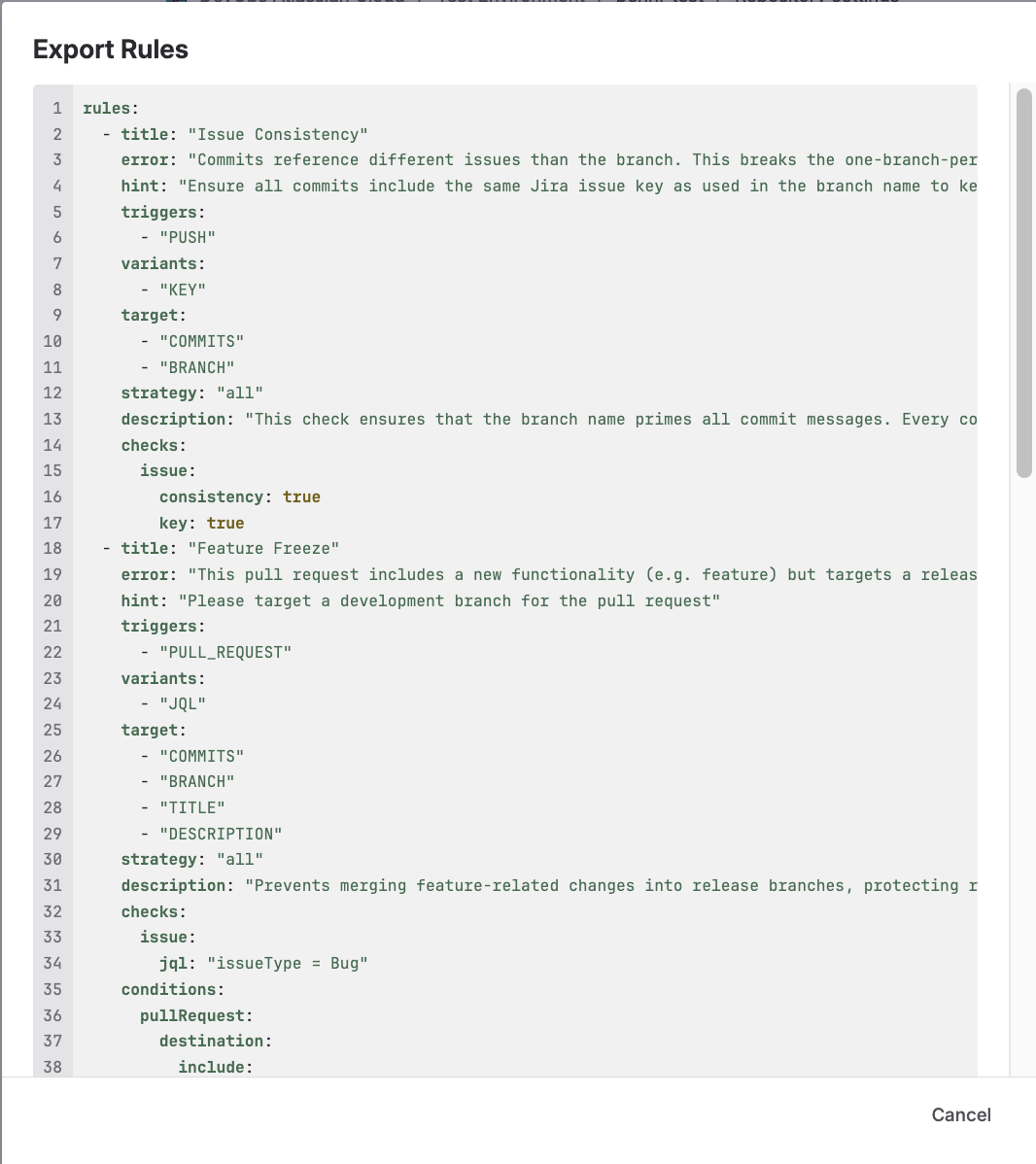
The user interface also supports the reverse workflow. Rules can be configured graphically in the Rules tab, and the corresponding YAML syntax can be generated through the Export function. This makes it possible to create or refine rules in the UI and then transfer them into a configuration as code setup.
Key takeaway
Configuration as code enables branch-specific, version-controlled rule definitions that are stored and managed directly in the repository, and it can also be combined with workspace rules in a hybrid setup.
Yaml Schema
$schema: "http://json-schema.org/draft-07/schema#"
$id: "cac-rules.schema.yaml"
title: "Process Guardian CaC Rules"
description: >
  Current Configuration-as-Code schema for Process Guardian rule files.
  The root document starts with `rules:` and contains rule objects directly.
  This schema documents the current preferred format and intentionally does
  not model the legacy `- rule:` wrapper.
type: object
required:
  - rules
additionalProperties: false

properties:
  rules:
    type: array
    description: >
      Ordered list of Process Guardian rules. Each entry is a rule object in the
      current CaC format without an additional `rule:` wrapper.
    minItems: 1
    items:
      $ref: "#/$defs/Rule"

$defs:
  Rule:
    type: object
    description: >
      One complete validation rule. A rule defines when it runs (`triggers`),
      what it validates (`target` and `checks`), and optional preconditions
      (`conditions`).
    additionalProperties: false
    required:
      - title
      - error
      - hint
    properties:
      title:
        type: string
        description: Human-readable name of the rule.
      error:
        type: string
        description: Message shown when the rule fails.
      hint:
        type: string
        description: Additional guidance shown alongside a failure.
      success:
        type: string
        description: Optional message shown when the rule passes.
      description:
        type: string
        description: Free-form documentation for the rule.
      enabled:
        type: boolean
        description: Enables or disables the rule.
        default: true
      triggers:
        type: array
        description: Which lifecycle events execute this rule.
        minItems: 1
        items:
          $ref: "#/$defs/RuleTrigger"
      variants:
        type: array
        description: Internal/UI-oriented rule variants. Usually omitted in handwritten CaC.
        minItems: 1
        items:
          $ref: "#/$defs/RuleVariant"
      target:
        type: array
        description: Which artifacts are validated by this rule.
        items:
          $ref: "#/$defs/ValidationTarget"
        uniqueItems: true
      strategy:
        $ref: "#/$defs/ValidationStrategy"
      checks:
        $ref: "#/$defs/Checks"
      conditions:
        $ref: "#/$defs/Conditions"

  RuleTrigger:
    type: string
    description: Trigger that causes the rule to run.
    enum:
      - COMMIT
      - PUSH
      - PULL_REQUEST

  RuleVariant:
    type: string
    description: Internal rule classification used by the application UI.
    enum:
      - GENERIC
      - JQL
      - NAMING
      - KEY

  ValidationTarget:
    type: string
    description: Runtime target that will be inspected by a rule.
    enum:
      - COMMIT
      - COMMITS
      - MERGE_COMMIT
      - BRANCH
      - TITLE
      - DESCRIPTION

  ValidationStrategy:
    type: string
    description: >
      Combination strategy for multiple targets or patterns.
      `all` means every item must match, `one` means one matching item is enough.
    enum:
      - all
      - one
    default: all

  Checks:
    type: object
    description: Validation checks that are executed when the rule runs.
    additionalProperties: false
    properties:
      issue:
        $ref: "#/$defs/IssueChecks"
      naming:
        $ref: "#/$defs/NamingChecks"

  IssueChecks:
    type: object
    description: Jira-related checks such as issue-key detection and JQL validation.
    additionalProperties: false
    properties:
      consistency:
        type: boolean
        description: Require matching issue keys across the configured targets.
      key:
        description: >
          Issue-key presence check. Supported forms:
          `true`, `"all"`, `"one"`, or an object with `enabled` and `strategy`.
        oneOf:
          - type: boolean
          - $ref: "#/$defs/ValidationStrategy"
          - $ref: "#/$defs/IssueKeyCheck"
      jql:
        description: >
          JQL validation for the found issues. Supported forms:
          a raw query string or an object with `query`, `enabled`, and `strategy`.
        oneOf:
          - type: string
          - $ref: "#/$defs/IssueJqlCheck"
      target:
        type: array
        description: Optional target override specifically for issue checks.
        items:
          $ref: "#/$defs/ValidationTarget"
        uniqueItems: true

  IssueKeyCheck:
    type: object
    description: Expanded issue-key check configuration.
    additionalProperties: false
    properties:
      enabled:
        type: boolean
      strategy:
        $ref: "#/$defs/ValidationStrategy"

  IssueJqlCheck:
    type: object
    description: Expanded JQL check configuration.
    additionalProperties: false
    properties:
      enabled:
        type: boolean
      query:
        type: string
      strategy:
        $ref: "#/$defs/ValidationStrategy"

  NamingChecks:
    type: object
    description: Naming convention checks for branch, commit, and pull-request text.
    additionalProperties: false
    properties:
      enabled:
        type: boolean
      branch:
        $ref: "#/$defs/NamingPatternGroupInput"
      commit:
        $ref: "#/$defs/NamingPatternGroupInput"
      pullRequest:
        type: object
        additionalProperties: false
        properties:
          title:
            $ref: "#/$defs/NamingPatternGroupInput"
          description:
            $ref: "#/$defs/NamingPatternGroupInput"

  NamingPatternGroupInput:
    description: >
      Naming pattern group shorthand. Either a single regex string or an object
      with `pattern`, `enabled`, and `strategy`.
    oneOf:
      - type: string
      - $ref: "#/$defs/NamingPatternGroup"

  NamingPatternGroup:
    type: object
    description: One or more regex patterns for a naming check.
    additionalProperties: false
    properties:
      pattern:
        type: array
        description: Regex patterns that are evaluated against the chosen target.
        items:
          type: string
      enabled:
        type: boolean
      strategy:
        $ref: "#/$defs/ValidationStrategy"

  Conditions:
    type: object
    description: Optional preconditions that decide whether a rule should run.
    additionalProperties: false
    properties:
      enabled:
        type: boolean
      showRule:
        type: boolean
      pullRequest:
        $ref: "#/$defs/PullRequestCondition"


  PullRequestCondition:
    type: object
    description: Pull-request-specific conditions.
    additionalProperties: false
    properties:
      enabled:
        type: boolean
      source:
        $ref: "#/$defs/IncludeExcludeCondition"
        description: Include/exclude rules for the source branch.
      destination:
        $ref: "#/$defs/IncludeExcludeCondition"
        description: Include/exclude rules for the destination branch.

  IncludeExcludeCondition:
    type: object
    description: Nested include/exclude structure used by current CaC conditions.
    additionalProperties: false
    properties:
      include:
        $ref: "#/$defs/IncludePatternGroupInput"
      exclude:
        $ref: "#/$defs/ExcludePatternGroupInput"

  IncludePatternGroupInput:
    description: Include shorthand. Either a regex string or an expanded object.
    oneOf:
      - type: string
      - $ref: "#/$defs/IncludePatternGroup"

  ExcludePatternGroupInput:
    description: Exclude shorthand. Either a regex string or an expanded object.
    oneOf:
      - type: string
      - $ref: "#/$defs/ExcludePatternGroup"

  IncludePatternGroup:
    type: object
    description: Expanded include-pattern definition.
    additionalProperties: false
    properties:
      pattern:
        type: array
        description: Regex patterns for include matching.
        items:
          type: string
      enabled:
        type: boolean
      strategy:
        $ref: "#/$defs/ValidationStrategy"

  ExcludePatternGroup:
    type: object
    description: Expanded exclude-pattern definition.
    additionalProperties: false
    properties:
      pattern:
        type: array
        description: Regex patterns for exclude matching.
        items:
          type: string
      enabled:
        type: boolean
      strategy:
        type: string
        enum:
          - all
          - one
        default: one