

Jira Hooks for Bitbucket is a Forge app that can be installed directly into your Bitbucket Cloud workspace. It enhances the integration between Jira and Bitbucket by automatically linking commits, branches, and pull requests to Jira issues, making it easier to track development activity within Jira.
This guide walks you through installing the app in Bitbucket Cloud using a secure installation link provided by Atlassian.
Installation Steps
-
Sign in to Bitbucket
Log in with your Bitbucket Workspace
-
Open the Installation Link
Click or copy-paste the following link into your browser (it can take some seconds to load the page):
-
Review Permissions
The app will request access to certain data (e.g., repositories, pull requests).
-
Click “Get app”
Start the installation via the Button “Get app”

-
Choose a Workspace
Select the workspace where you want to install the app
-
Click “Install”
Confirm the installation by clicking the Install button.
-
Enable Custom Merge Checks
The next step is to enable Jira Hooks for Bitbucket as a custom merge check. You can enable the custom merge check globally or per repository. (e.g. https://bitbucket.org/<your-workspace>/workspace/settings/merge-checks)

Please configure the check for all branches, and if you are using a Bitbucket Premium version, you can also mark this check as Required.
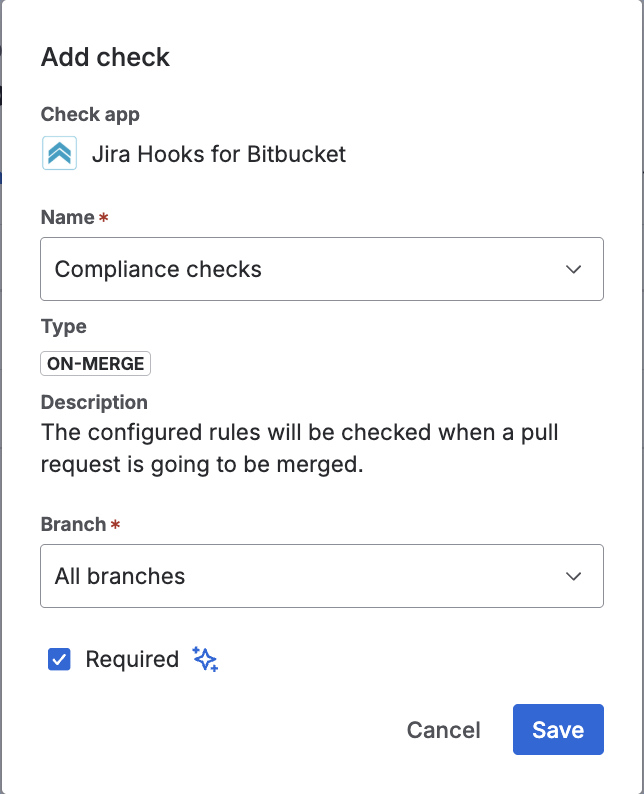
To use Custom Merge Checks in a way that blocks pull requests, you must have a Bitbucket Premium plan.
The app Jira Hooks for Bitbucket cannot override or change this behavior, as it is a limitation set by Atlassian’s licensing model.
For more details, see Atlassian’s official documentation:
Next steps
Configure the Process Guardian: Define the global behavior of the Process Guardian, such as issue key detection, validation mode, and review behavior.