

Pull request validation is the primary enforcement mechanism of Jira Hooks for Bitbucket Cloud. It ensures that all configured compliance rules are evaluated before changes are merged into protected branches. The Process Guardian continuously evaluates pull requests against the configured rule set and provides immediate feedback to developers and reviewers. Validation results are visible directly within the pull request and can also be used to block merges when compliance requirements are not satisfied.
When validation is executed
Pull requests are automatically validated whenever the Process Guardian is enabled for the repository or workspace and at least one rule is configured for the Pull Request trigger. No further setup is required. Validation is performed automatically throughout the pull request lifecycle to ensure that compliance information remains up to date.
Pull request validation is triggered automatically during several stages of the pull request lifecycle.
|
Event |
Description |
|---|---|
|
Create |
Validation is executed when a pull request is created. |
|
Update |
Validation is executed when the pull request changes, for example after new commits are pushed. |
|
Page load |
Validation is executed when a user opens the pull request page. |
|
Merge |
Validation is executed immediately before the merge operation. |
|
Manual recheck |
Validation can be triggered manually through the user interface. |
This ensures that validation results remain up to date throughout the entire review process.
Page load validation and caching
Pull requests are automatically revalidated when the page is opened. To reduce unnecessary cloud resource consumption, page-load validations are currently cached for 1 minutes. If a recent validation result exists, the cached result is shown. Otherwise, a new validation is executed automatically.
Why is caching used?
Jira Hooks for Bitbucket is currently provided free of charge. While the application itself is free, the underlying cloud infrastructure, Forge execution time, Jira API calls, and computation resources generate real operating costs that are paid by DevOpsSystems. The cache significantly reduces unnecessary validation executions while still providing timely feedback to users.
Future behavior
Once the product becomes commercially available, the caching strategy may be adjusted. The long-term goal is to execute validation on every page load, ensuring that users always see the most current compliance status without delay.
Validation overview
The validation overview is displayed as a dedicated Jira Hooks for Bitbucket Pull Request card in the right sidebar of the pull request.
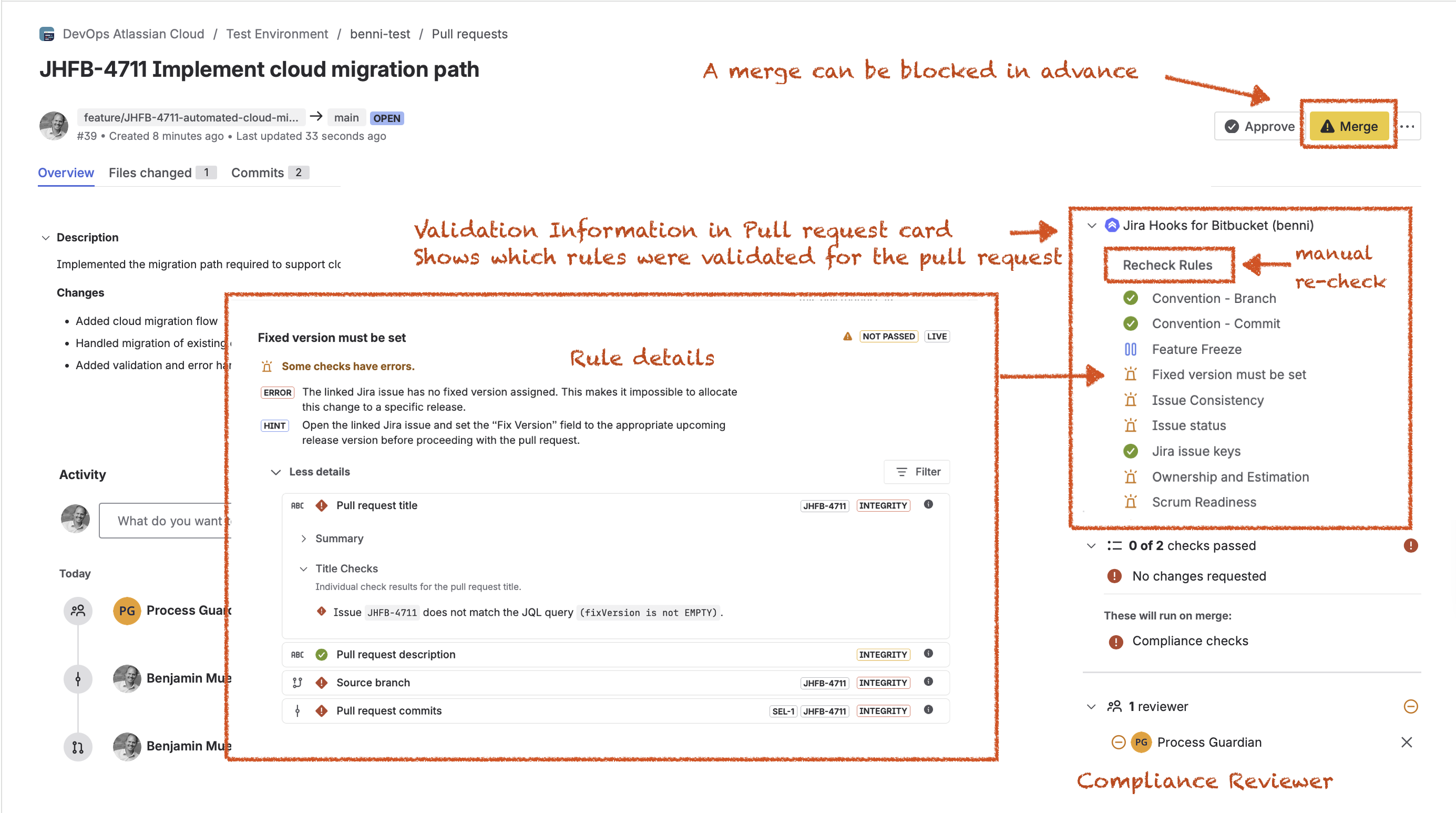
The card provides a centralized overview of all rules that were evaluated for the pull request together with their current validation status. It allows developers and reviewers to quickly understand the overall compliance state without navigating away from the pull request.
The validation card includes:
-
Passed rules
-
Failed rules
-
Skipped rules
-
The Recheck Rules action for manual validation
-
Direct access to detailed rule results
This makes it possible to identify compliance issues at a glance and immediately drill down into the affected rules.
Manual revalidation
Validation can be triggered manually at any time using the Recheck Rules button shown in the validation card.
Manual revalidation immediately executes a fresh validation and bypasses any existing page-load cache.
This is useful when:
-
Jira issue data has changed
-
Rule configurations have been updated
-
Validation results should be refreshed immediately
-
Users do not want to wait for the cache to expire
Rule details
Selecting a rule from the validation card opens the detailed validation view. Each configured validation target is evaluated within its own validation context. This allows users to clearly understand where a validation result originated and which part of the pull request was responsible for a success or failure.
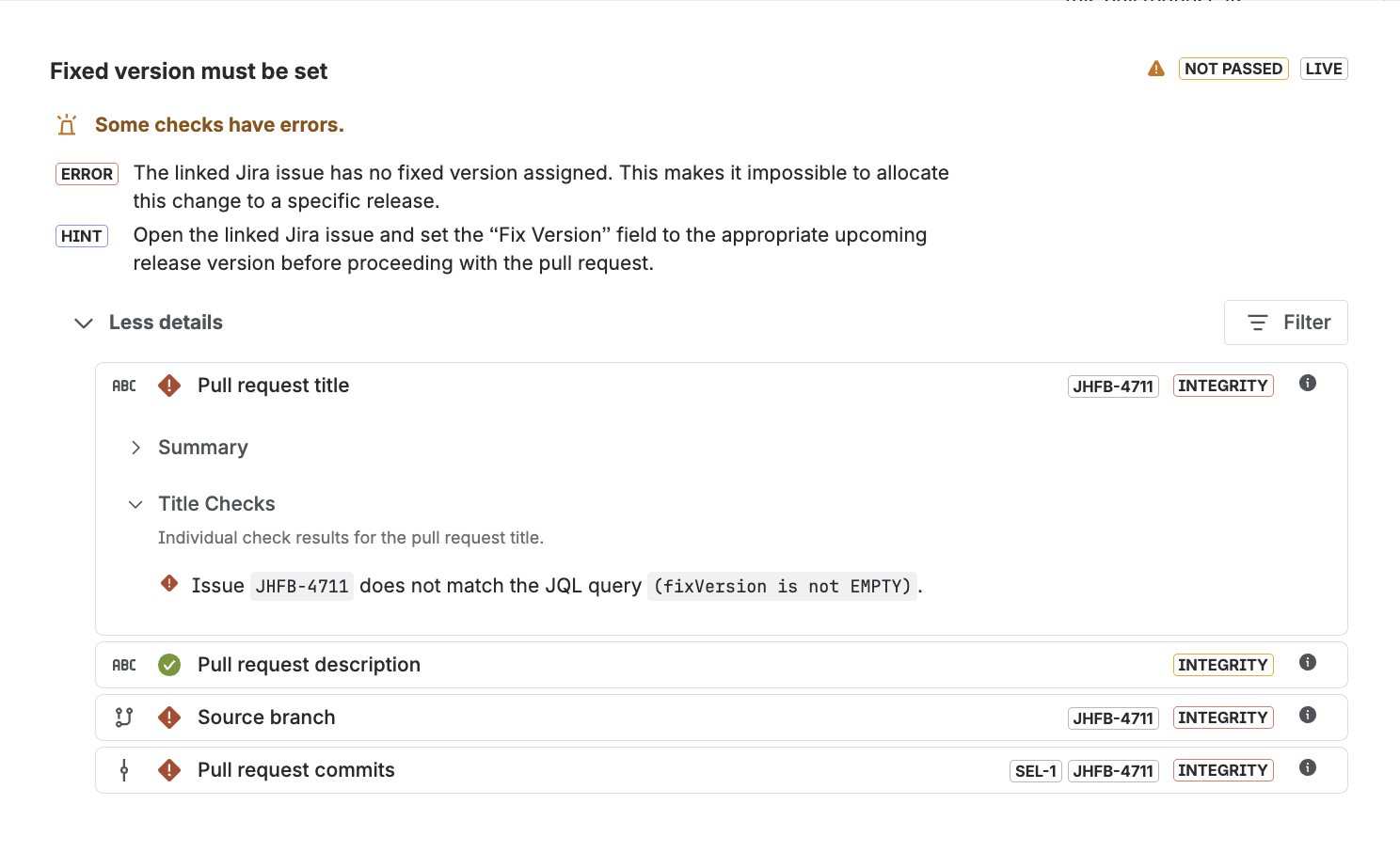
In the example shown above, the rule was executed against multiple validation targets. The Process Guardian evaluated the pull request title, pull request description, source branch, and the commits associated with the pull request. Each target produced its own validation results, which are grouped under the corresponding target section.
This separation is particularly useful when the same check is executed against multiple targets. For example, an issue key check may validate issue references in the branch name, pull request title, and commit messages simultaneously. The target-specific structure makes it easy to identify exactly where a violation occurred and which part of the pull request must be corrected.
The detailed view provides a complete breakdown of the validation result and explains exactly why a rule passed or failed.
The view includes:
-
Rule title
-
Validation status
-
Error messages
-
Resolution hints
-
Validation targets
-
Executed checks
-
Detailed validation facts
Process Guardian reviews
The Process Guardian can participate directly in the pull request review workflow as an automated reviewer. This behavior is optional and must be explicitly enabled in the repository or workspace settings. When enabled, validation results influence the review process itself. Based on the validation outcome, the Process Guardian can:
-
Approve pull requests
-
Request changes
-
Remove previous approvals
-
Reevaluate reviews when pull requests change
This integration provides a significant advantage when Bitbucket branch restrictions are configured. For example, if a repository requires that pull requests must not contain any change requests before they can be merged, a Process Guardian review can immediately block the pull request by requesting changes when a compliance violation is detected.
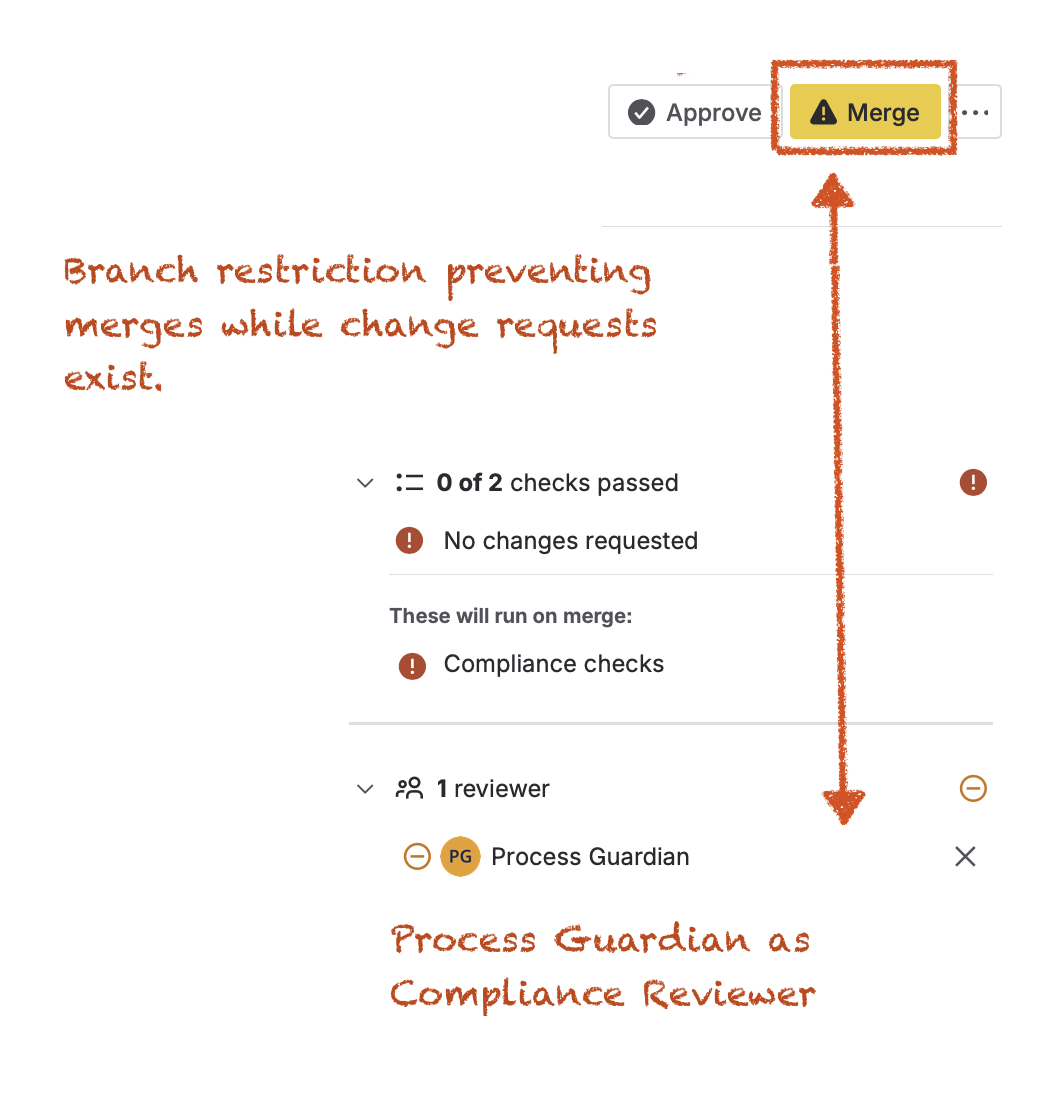
As a result, developers receive feedback much earlier in the workflow, often immediately after creating or updating a pull request, instead of discovering violations only when attempting to merge.
For the best developer experience, it is therefore recommended to enable Process Guardian reviews in addition to validation itself. Early feedback reduces unnecessary review cycles and allows compliance issues to be resolved before the merge phase is reached.
Due to a current limitation of the Atlassian Forge runtime, changes to the review state are not reflected immediately in the Bitbucket user interface.
If the Process Guardian changes its review state, for example by approving a pull request or requesting changes, the updated state becomes visible after the pull request page is reloaded. At that point, Bitbucket retrieves the latest review information and displays the updated status in the reviewer section.
For the highest level of enforcement, it is recommended that the Process Guardian participates in the review process and that appropriate branch restrictions are configured.
Custom merge checks
Bitbucket Custom Merge Checks provide server-side merge protection and represent the strongest enforcement mechanism available in Bitbucket Cloud. Unlike pull request reviews or cached validation results, merge checks are executed directly as part of the merge process itself.
Because the validation is performed immediately before the merge is executed, the result is always based on the current state of the pull request. The check is not affected by previous validations, cache lifetimes, page reloads, or timing-related dependencies.
As a result, Custom Merge Checks provide the final and authoritative compliance decision and ensure that non-compliant pull requests cannot be merged into protected branches.
For this reason, it is strongly recommended to enable Custom Merge Checks, even when Process Guardian reviews are already configured. While Process Guardian reviews provide valuable early feedback and can prevent many non-compliant pull requests from progressing through the review process, Custom Merge Checks act as the final server-side enforcement mechanism and ensure that compliance requirements are validated immediately before the merge is executed.
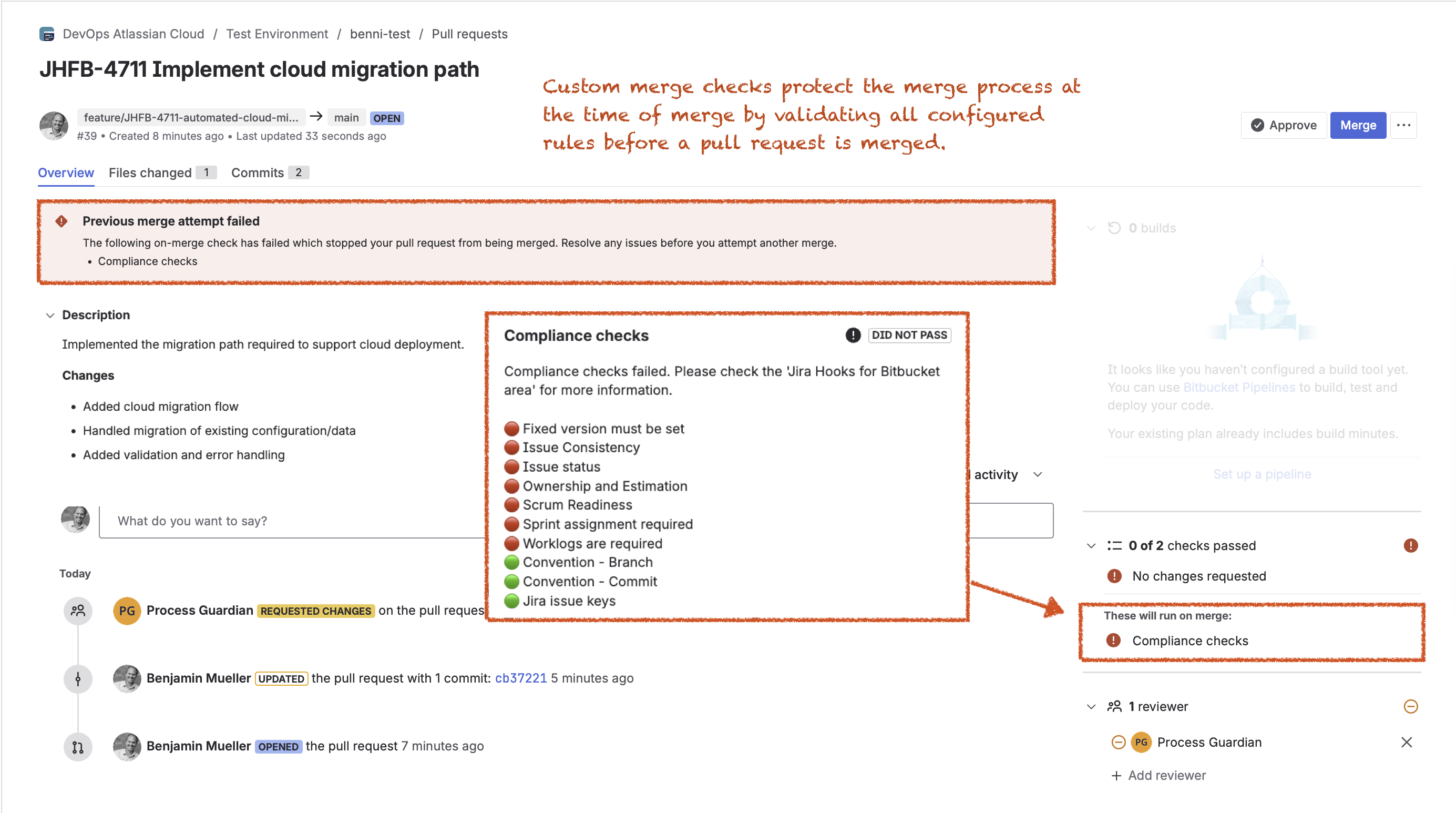
It is important to understand that the custom merge check itself does not continuously validate the pull request. Its purpose is solely to protect the merge operation at the moment of merge.
The detailed validation information remains available through the Jira Hooks for Bitbucket validation card, where users can inspect failed rules and resolve issues before attempting another merge.
Persistent pull request validation results for a complete audit trail
Compliance and governance requirements often require more than a simple pass or fail result at the time of merge. To support long-term traceability and auditing, Jira Hooks for Bitbucket preserves the complete validation history of merged pull requests.
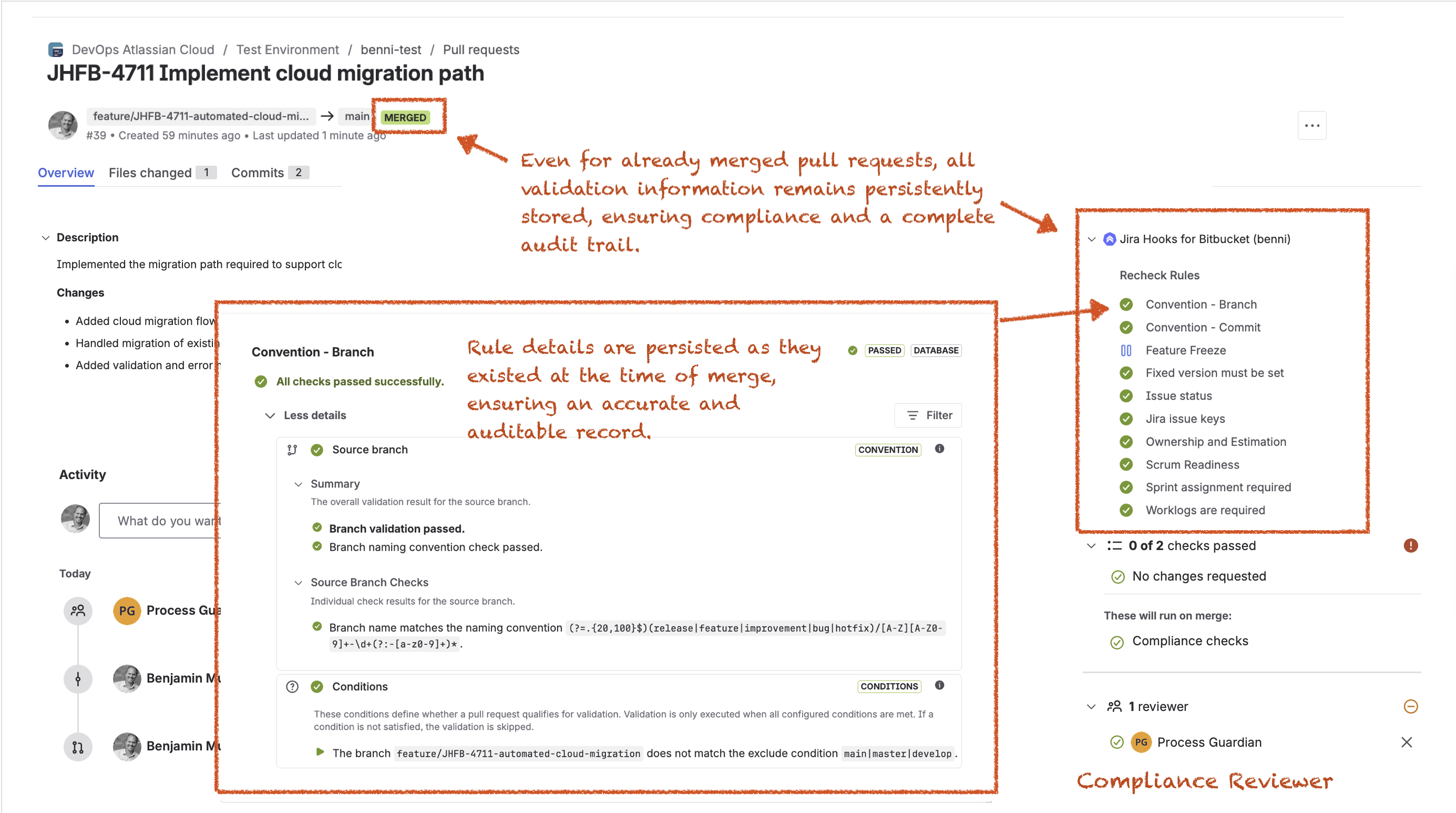
At the time of merge, Jira Hooks for Bitbucket creates a persistent compliance record of all rules. These records are stored exactly as they existed at the moment the pull request was merged.
This behavior is particularly important because rule configurations, Jira issues, branch names, repository settings, and project processes may change over time.
The persisted validation record preserves the historical state of the review and validation process and provides a reliable audit trail for compliance, governance, and traceability requirements. Even long after a pull request has been merged, users can still inspect the original validation results and understand exactly why a pull request was approved, blocked, or successfully merged.
Key takeaway
Pull request validation continuously evaluates compliance requirements throughout the pull request lifecycle. Validation is performed when pull requests are created, updated, viewed, manually rechecked, and merged. Results are displayed directly inside Bitbucket, can participate in the review process through the Process Guardian, and can block merges before non-compliant changes reach protected branches.
Next steps
Rules are now configured and actively enforced during pull request validation.
If you want to shift compliance checks even further left in the development process, continue with Commit and Push Validation to learn how the same rules can be enforced before changes are committed or pushed to Bitbucket Cloud. This allows developers to receive feedback earlier and resolve violations before a pull request is even created.