

To enable the highest level of enforcement, it is recommended that the Process Guardian participates in the pull request review process. This is achieved by adding the Process Guardian as a default reviewer and configuring the corresponding branch restriction settings.
Before the Process Guardian can review pull requests, the “Process Guardian reviews pull requests” option must be enabled in the repository or workspace settings. When enabled, the Process Guardian can automatically approve pull requests that satisfy all configured rules or request changes when violations are detected.

This configuration is available at both levels:
-
Workspace Settings → Forge → Jira Hooks for Bitbucket → Process Guardian
-
Repository Settings → Forge → Jira Hooks for Bitbucket → Process Guardian
Required merge settings
Once review capabilities are enabled, the Process Guardian user can be added as a default reviewer. Combined with appropriate branch restriction settings, this allows validation results to directly influence the review and merge process, providing the highest level of enforcement and visibility for compliance and governance requirements.
|
Option |
Description |
Impact in this use case |
|---|---|---|
|
Branch name or pattern |
Defines which branches the restriction applies to. You can use exact names or patterns (wildcards). |
Using Asterisk “*” applies the configuration to all branches, ensuring the Process Guardian is enforced everywhere and no branch is accidentally excluded. |
|
Minimum number of approvals from default reviewers |
Requires that a defined number of default reviewers must approve the pull request before it can be merged. |
Ensures that the Process Guardian approval is required. It also ensures that a newly created pull request cannot be merged as long as no validation result is available yet. |
|
No changes are requested |
Ensures that no reviewer has an active change request. |
A veto from the Process Guardian blocks the merge, as it is treated as a requested ce. |
|
Prevent a merge with unresolved merge checks |
Blocks the merge if any merge checks are not successful. |
Guarantees that all validation results are respected, and the merge is blocked if checks fail or are still pending. Note that this option enforces all merge checks and is only available in Bitbucket Premplans. |
This configuration is available at both levels:
-
Workspace Settings → Workflow → Branch restrictions
-
Repository Settings → Workflow → Branch restrictions
Why this setup is useful
This setup allows validation results to be visible and enforced earlier in the workflow, helping teams identify issues before attempting a merge. While this is not strictly required for enforcement, it provides a significant usability benefit by surfacing problems as early as possible and improving overall developer feedback.
With this setup:
-
the Process Guardian validates the pull request when it is created, when the page is loaded, and on updates
-
it acts as a reviewer and can approve or set a veto based on the validation result
-
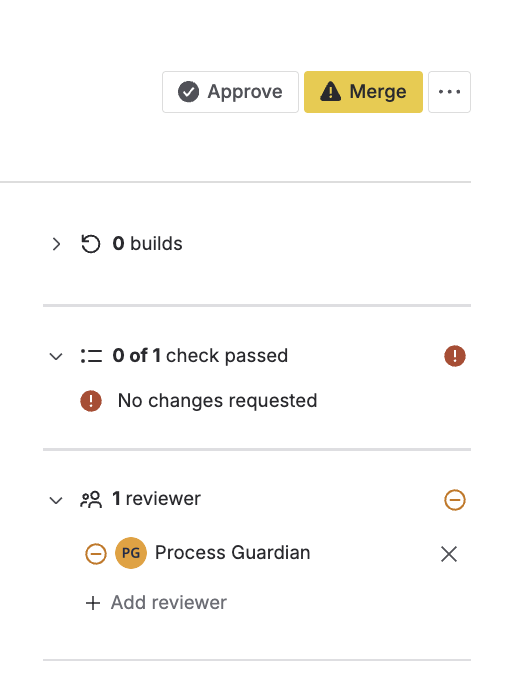
a veto directly blocks the merge via branch restrictions, so the merge cannot be executed
⚠️ If these settings are not configured:
-
the Process Guardian still evaluates the pull request
-
however, a veto has no impact on merge behavior and will not block the merge
Optional configuration
This setup is not required. If custom merge checks for Jira Hooks are enabled, validations run when the Merge button is confirmed. In that case, failing checks will still block the pull request at merge time.
The branch restriction setup is therefore primarily a convenience feature that shifts validation earlier into the review flow and provides immediate feedback.
Key takeaway
By combining default reviewers with merge settings, the Process Guardian becomes an active reviewer that can enforce compliance directly within the pull request workflow.