

Checks define what is validated within a rule. They enforce specific compliance requirements, such as validating Jira issues, ensuring correct naming conventions, or verifying the presence and consistency of issue keys. Checks are executed only when a rule is triggered and its conditions are met. As a result, they form the core validation logic within the system.
Checks are executed against the selected Validation Targets. Depending on the rule configuration, validations can be performed against commits, branch names, pull request titles, or pull request descriptions.
A rule may use a single check or combine multiple checks. This allows teams to create simple validations or more advanced compliance policies within a single rule.
Issue checks
The issue check validates the presence, validity, consistency, and compliance of Jira issue references. It ensures that commits, branches, pull request titles, and pull request descriptions reference valid Jira issues and, when required, consistently point to the same work item.
The check can verify that issue keys exist, that they can be resolved in Jira, and that the referenced issues satisfy additional requirements through configurable JQL queries. This allows teams to enforce workflow policies directly from Jira, such as requiring specific issue statuses, issue types, projects, or custom field values before changes can progress through the development workflow.
By enforcing valid and consistent issue references, the issue check strengthens the relationship between code changes and tracked work. This improves traceability, reduces ambiguity, and creates a reliable audit trail that allows teams to understand why changes were made, which Jira issues they relate to, and whether all governance requirements were satisfied at the time of validation.
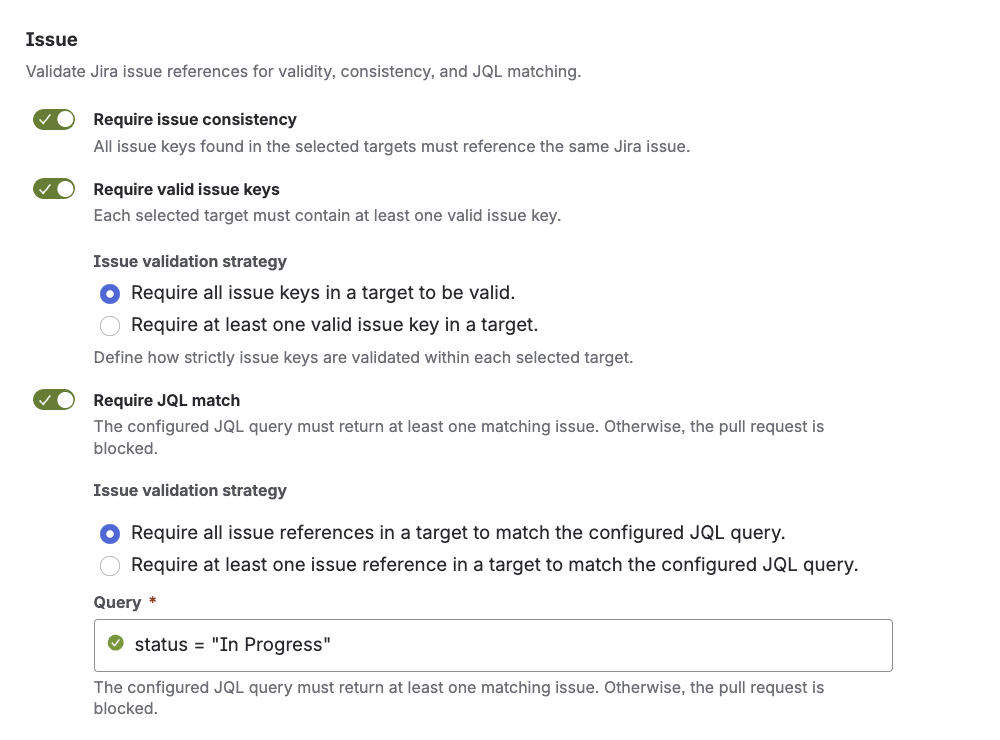
Configuration options
-
Require issue consistency - When enabled, all issue keys found within the selected validation targets must reference the same Jira issue. This check is useful when commits, branches, pull request titles, or pull request descriptions are expected to refer to the same work item.
-
Require valid issue keys - When enabled, each selected validation target must contain at least one valid Jira issue key. Detected issue keys are validated against Jira to ensure that they exist and can be resolved successfully.
-
Require JQL match - When enabled, all detected Jira issues are validated against the configured JQL query. This allows teams to enforce workflow requirements directly from Jira, such as issue status, issue type, project membership, sprint assignments, or custom field values.
The Issue validation strategy determines how multiple issue keys or JQL checks within the same validation target are evaluated.
-
All: All detected issue keys within the target must be valid Jira issues (or match the JQL).
-
One: At least one detected issue key within the target must be a valid Jira issue (or match the JQL).
Key takeaway
The issue check ensures that code changes are linked to valid Jira issues and, when required, consistently reference the same work item across commits, branches, and pull requests. By validating issue existence, consistency, and JQL compliance, it improves traceability, enforces workflow requirements, and strengthens the overall audit trail of the development process.
Naming convention check
The naming convention check validates naming standards across branches, commits, and pull requests. It ensures that all names and messages follow defined patterns, typically based on regular expressions.
Configuration options
|
Option name |
Description |
|---|---|
|
Branch name |
Defines the naming rules for branch names. This option is used to enforce a consistent branch structure, for example by requiring a specific prefix, the location of an a Jira issue key, or another repository-specific naming pattern. |
|
Commit messages |
Defines the rules for commit messages. This option is used to enforce a consistent commit message format, for example by requiring a Jira issue key, a structured prefix, or a predefined message pattern. |
|
Pull request titles |
Defines the naming rules for pull request titles. This option helps enforce a consistent and traceable title format across pull requests. |
|
Pull request descriptions |
Defines the content rules for pull request descriptions. This option can be used to require a certain structure, mandatory information, or a specific text pattern in the description. |
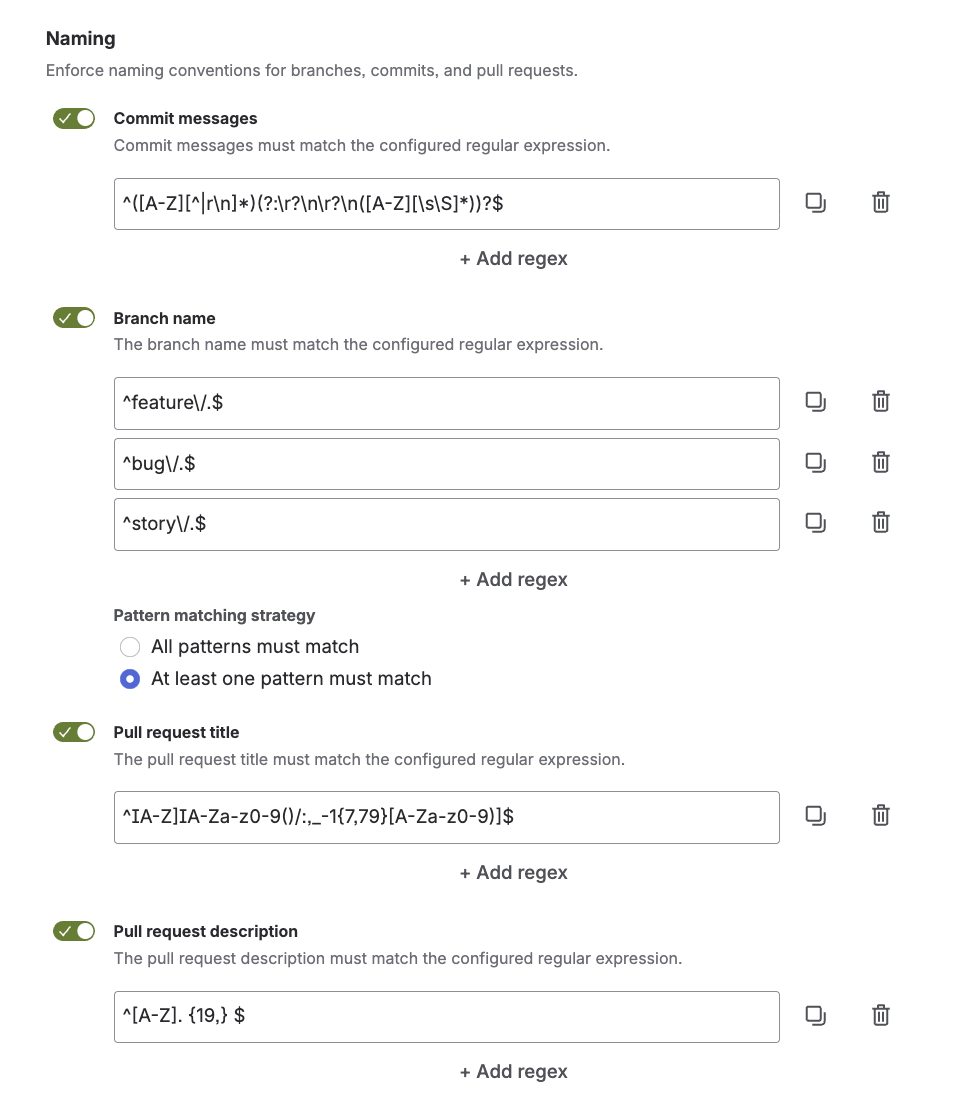
Each naming option can contain one or multiple regular expressions. If multiple expressions are configured, the matching strategy defines how they are evaluated:
-
All: All configured regular expressions must match
-
One: At least one configured regular expression must match
User interface
The following screenshot shows how to configure the naming convention check:
Key takeaway
The naming convention check enforces consistent standards across the workflow.
Next steps
Conditions define when a rule applies. Use conditions to restrict rules to specific contexts, for example certain branches, users, or pull request flows, so that validation is only executed where it is relevant.