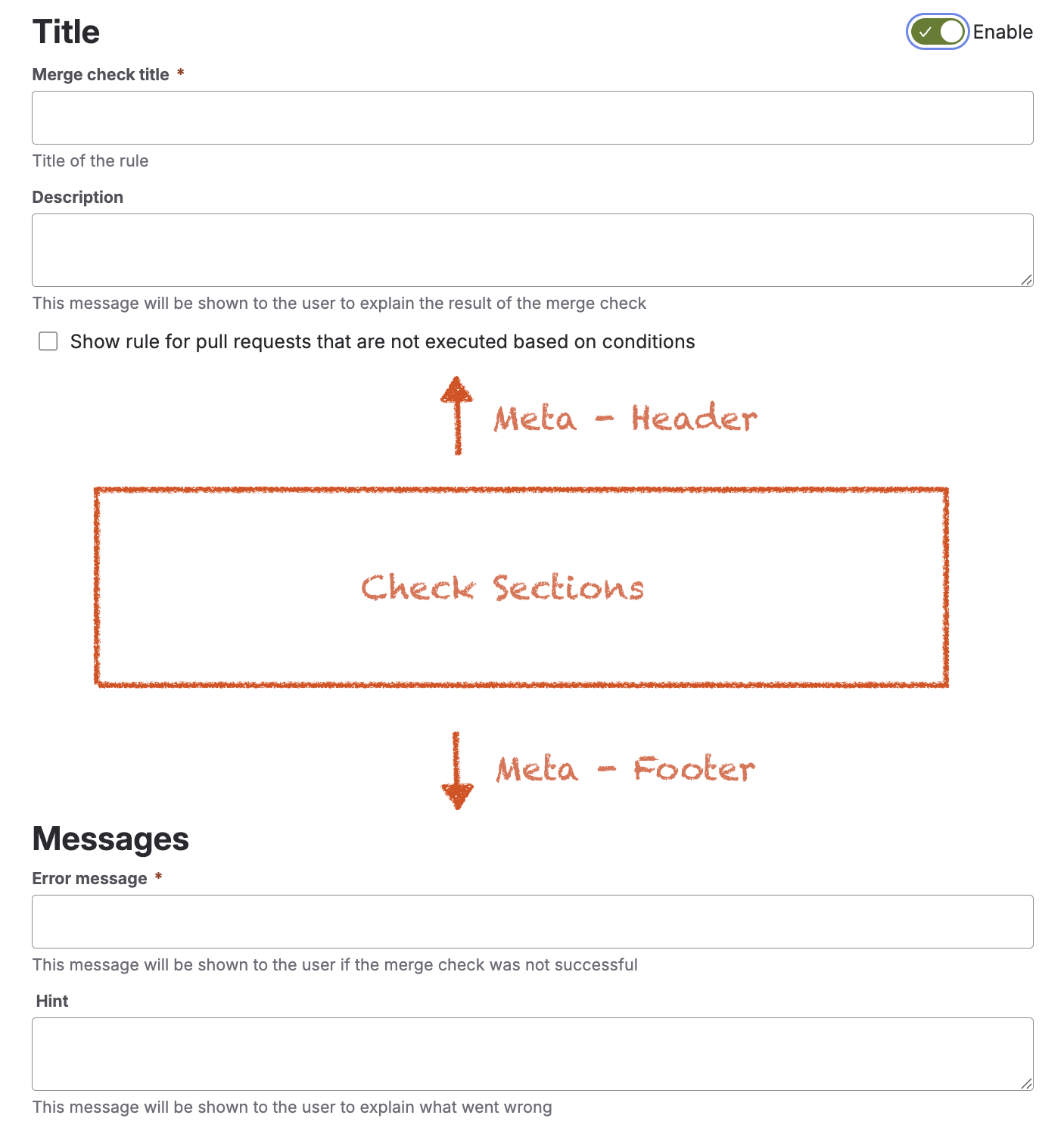
Rule metadata defines the general properties and user-facing information of a rule, as well as how it is presented and handled during evaluation. The following settings are always part of a rule
Common Information
|
Setting |
Description |
|---|---|
|
Title |
Defines the display name of the rule. The title helps identify the rule in the configuration and can also be shown to users when the rule is evaluated or when a validation error occurs. |
|
Enabled |
Controls whether the rule is active. Disabled rules remain part of the configuration but are ignored during evaluation. |
|
Description |
Explains the purpose of the rule and documents what the rule is intended to validate. This helps administrators and project teams understand the compliance objective behind the rule. |
|
Show rule |
Controls whether the rule is displayed in pull requests even if it is not executed due to unmet conditions. This helps improve transparency by showing which rules exist but were not applied. |
|
Error message |
Defines the error message shown to users when the rule fails. This message should clearly explain why the action is non-compliant. |
|
Success message |
Specifies the success message displayed to users when the rule is met. This message should clearly explain why the action is compliant. |
|
Hint message |
Provides additional guidance to help users resolve a validation error. This text is shown together with the error message and should describe what the user needs to change. |
The following screenshot shows the dialog used to create and configure the rule metadata: